
What is Stormy AI?
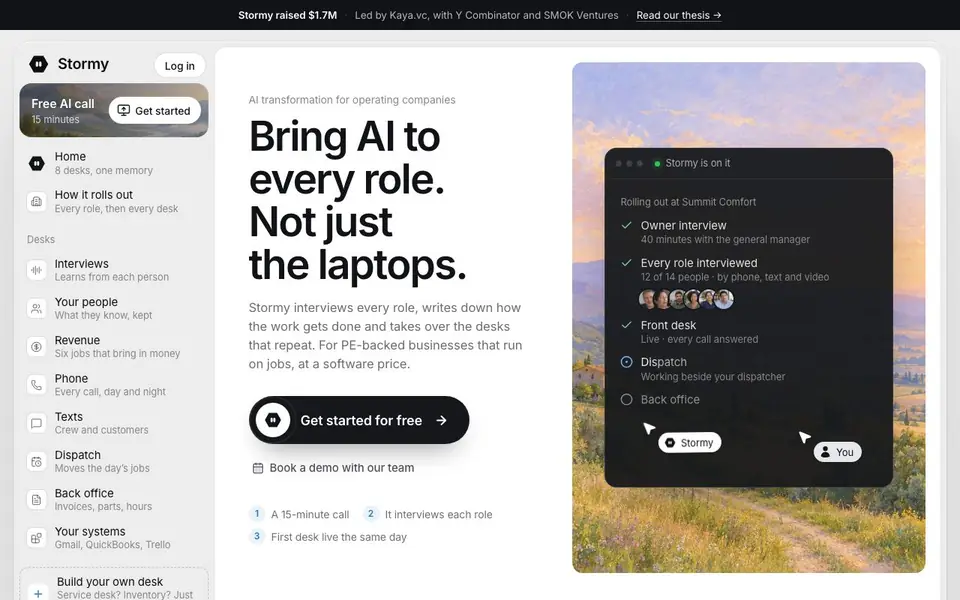
Stormy is an AI agent built for operating companies like HVAC, plumbing, or field service businesses. It interviews the people in each role, learns how they work, and then takes over repetitive tasks. It reaches everyone, not just those at laptops, through calls, texts, and email.
You start with a 15-minute call where Stormy maps your company and picks the first desk to automate. Then it interviews each role, asking about steps, limits, and who approves what. It writes everything down and tests itself before going live. Your first desk can be live the same day.
Stormy works inside your existing tools like Gmail, QuickBooks, and Trello. It answers calls day and night, sends quotes, chases overdue invoices, and dispatches crews. It leaves a receipt for every action. The site notes it is for PE-backed businesses and mentions a software price, but does not list specific pricing.
Stormy AI features
- Role interviews: Stormy talks to each person on your team, by phone, text, or video, to learn their job.
- Call answering: It answers every call, day and night, so you never miss a job.
- Dispatch: It moves the day's jobs and works beside your dispatcher.
- Quotes and invoices: It sends quotes and chases overdue invoices using your price sheet and approval rules.
- System integration: It works inside your email, calendar, books, and boards like Gmail, QuickBooks, and Trello.
What you can do with Stormy AI
- Answer customer calls and texts automatically around the clock.
- Dispatch crews to jobs based on priority and availability.
- Send quotes that match your pricing rules and approval limits.
- Chase overdue invoices with reminders and pay links.
- Write down how each role works so new hires learn faster.
How to get started with Stormy AI
- Book a 15-minute call with Stormy's team or get started for free.
- Stormy interviews each role, including people who never open a laptop.
- Your first desk goes live the same day, and Stormy keeps learning as work changes.
Tips for better results with Stormy AI
- Start with the 15-minute call and clearly describe your company's workflow, including who approves what and any spending limits, so Stormy maps the right first desk to automate.
- During role interviews, have each team member explain their exact steps, approval rules, and exceptions, because Stormy writes down what they say and uses it to run the desk.
- Use Stormy inside your existing Gmail, QuickBooks, and Trello tools, and check its receipts after each action to confirm it followed your rules and to catch any missteps early.
- Test Stormy on one desk first, like front desk call answering, before rolling out to dispatch or invoicing, so you can adjust its learned steps with real feedback.
Stormy AI pricing
Stormy AI’s homepage does not list prices. Check stormy.ai for current plans.
What to check before you rely on Stormy AI
- Check whether the software price fits your budget, since the site mentions a price but does not list specific numbers or plan tiers.
- Verify which of your existing tools, like Gmail, QuickBooks, or Trello, are supported for your setup, as the site lists these but may not cover every system you use.
- Confirm how Stormy handles data privacy for the interviews it records, since the site does not state retention, access, or deletion policies for your team's information.
Who Stormy AI is for
Stormy AI suits field service companies, PE-backed operating businesses, general managers and office managers. If that is not you, the AI agents below may fit better.
Similar tools compared with Stormy AI
| Tool | What it is | Pricing |
|---|---|---|
| Stormy AI | AI agent that runs job-based businesses | See website |
| n8n | AI workflow automation platform | Freemium |
| Lindy | AI teammate for team workflows | Freemium |
| Zapier | AI workflow and agent orchestration platform | Freemium |
| LM Studio | Local AI agent for work and code | See website |
Stormy AI FAQ
What does Stormy do?
Stormy is an AI agent for businesses that run on jobs. It answers calls and texts, dispatches crews, sends quotes and invoices, tracks inventory, and learns each job from your team members through interviews.
How does Stormy learn how my business works?
Stormy interviews each role in your company, either by phone, text, or video. It watches you do a task once, asks questions about what it didn't see, writes the steps down, and tests itself before going live.
Who is Stormy for?
Stormy is for PE-backed businesses that run on jobs, like service companies with techs, drivers, and dispatchers. It reaches every role, not just people at laptops, and rolls out across the whole company.
What does Stormy cost?
The website does not state specific pricing. It says Stormy is available at a software price and offers a free 15-minute call to get started, but you would need to contact them for details.
Does Stormy AI work on my phone or tablet?
Stormy AI reaches your team through calls, texts, and email, so you can interact with it from a phone or tablet. The website does not mention a dedicated mobile app, but you can use it through the channels it supports. Check the site's integration details for more.
What does the free plan of Stormy AI include?
Stormy AI offers a free 15-minute call to map your company and pick the first desk to automate. The website does not list specific free plan features beyond this initial call. For details on what's included after that, you'll need to book a demo or contact the team.
Can Stormy AI integrate with my existing software?
Stormy AI works inside your existing tools like Gmail, QuickBooks, and Trello. It also connects with your email, calendar, books, and boards. The website does not list all possible integrations, so if you use other software, check with the Stormy AI team to confirm compatibility.


