
What is Skills?
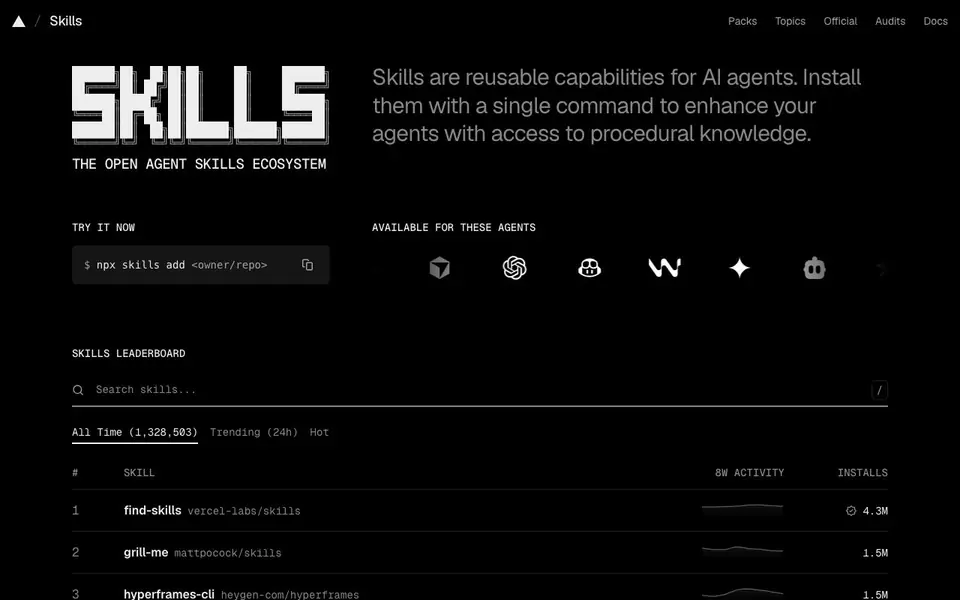
Skills is an open directory of reusable capabilities for AI agents. You can browse skills by topic, agent, or popularity, and install them using a simple command. It is built by Vercel and hosts skills from various providers like Vercel Labs, Anthropic, and others.
To get started, you browse the directory or use the CLI. The command `npx skills add <owner/repo>` installs a skill directly into your agent environment. Skills are open source on GitHub, so you can also contribute or customize them.
This directory suits developers working with AI agents like Claude Code, Cursor, Codex, GitHub Copilot, Windsurf, Gemini, and others. It helps you enhance agents with procedural knowledge, such as code review, design, or automation. The site includes a leaderboard showing trending and most-installed skills, plus security audits for some skills.
Skills features
- Skill discovery: Browse skills by topic, agent, or popularity to find what you need.
- One-command install: Use `npx skills add <owner/repo>` to install a skill quickly.
- Leaderboard: See trending and most-installed skills to gauge community adoption.
- Official and audited skills: Filter for official or security-audited skills for trust.
- Open source: Skills are hosted on GitHub, allowing contributions and transparency.
What you can do with Skills
- Install a code review skill into your AI coding assistant.
- Add a frontend design skill to generate UI mockups.
- Use a browser automation skill for web tasks.
- Find a marketing skill to automate social media workflows.
How to get started with Skills
- Visit the Skills website and browse the directory or leaderboard.
- Find a skill you want and note its owner/repo.
- Run `npx skills add <owner/repo>` in your terminal to install it.
Tips for better results with Skills
- Browse the Skills leaderboard to see which skills have the most installs, then start with those high-traffic options to get proven, community-tested capabilities for your agent.
- Use the `npx skills add <owner/repo>` command with Skills to install a skill directly into your agent environment, and verify the owner and repo name from the directory listing.
- Filter Skills by the Official or Audits tabs when you need trusted capabilities, especially for production work, since these indicate a higher level of review and reliability.
- Check the Topics and Agents filters on Skills to narrow down skills that match your specific agent type, such as Claude Code or Cursor, and your use case like code review or design.
Skills pricing
Skills’s homepage does not list prices. Check skills.sh for current plans.
What to check before you rely on Skills
- Check that the skill you install from Skills is compatible with your specific agent, since the directory lists many agents but does not state compatibility details for each skill.
- Review the skill's GitHub repository for maintenance activity and open issues before relying on it, as Skills does not provide version history or update frequency.
- Verify the security audit status of a skill on Skills, since only some skills are audited and the directory does not disclose what the audit covers.
- Confirm the installation command works in your environment, as Skills does not list system requirements or dependencies for running the CLI.
Who Skills is for
Skills suits developers, AI agent users and DevOps teams. If that is not you, the AI developer platforms below may fit better.
Similar tools compared with Skills
| Tool | What it is | Pricing |
|---|---|---|
| Skills | Directory and CLI for AI agent skills | See website |
| SiVideoAPI | Unified API for top AI video models | Freemium |
| OpenSI | AI model comparison and pricing tool | See website |
| OpenRouter | Unified API for many AI models | Freemium |
| Ollama | Run open models locally or cloud | Freemium |
Skills FAQ
What are AI agent skills?
Skills are reusable capabilities that you can add to AI agents to give them procedural knowledge, like how to do code review or generate images. They are installed with a single command.
How do I install a skill?
You use the command `npx skills add <owner/repo>` in your terminal. The site provides the owner/repo for each skill, so you can copy it directly.
Which AI agents are supported?
The site lists support for agents like Claude Code, Cursor, Codex, GitHub Copilot, Windsurf, Gemini, Cline, and others. You can browse skills by agent to see compatibility.
Is Skills free to use?
The website does not state pricing details. Skills are open source on GitHub, but the directory and CLI may have costs. Check the site's docs or GitHub for more information.
Does Skills require an account to browse or install skills?
The Skills website does not mention requiring an account to browse the directory or install skills. You can likely use the CLI command npx skills add <owner/repo> directly. For confirmation, check the Skills documentation or FAQ page on the website.
Can I use Skills with agents other than the ones listed on the homepage?
Skills lists support for agents like Claude Code, Cursor, Codex, GitHub Copilot, Windsurf, Gemini, and others. The website does not specify whether it works with agents not listed. To find out, check the Skills documentation or contact the project via GitHub.
What does the free plan of Skills include?
The Skills website does not mention any pricing or a free plan. It appears to be an open directory with open-source skills on GitHub. For details on any costs or limitations, check the Skills FAQ or contact the project maintainers.


