

What is SecureSaaS?
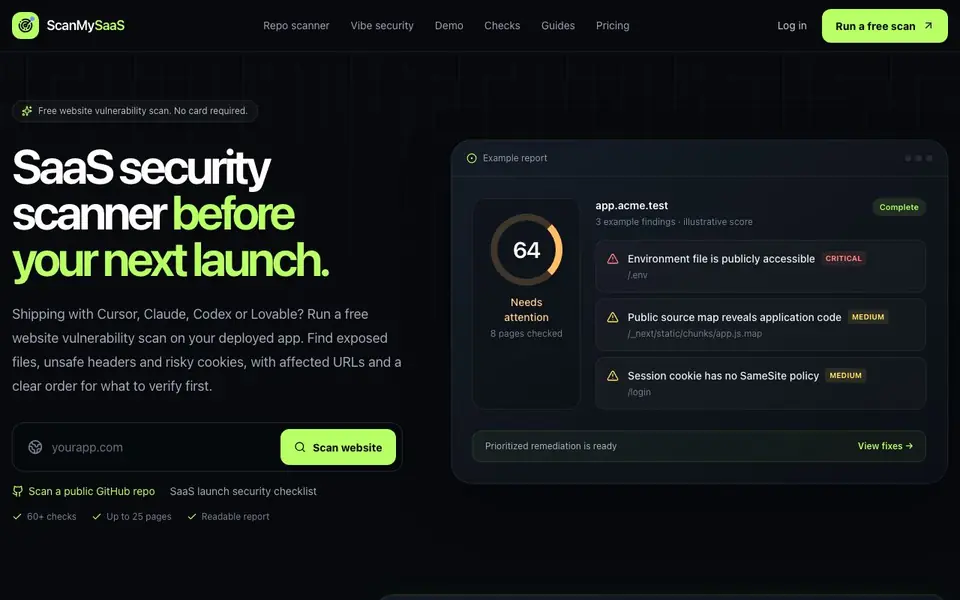
ScanMySaaS is a security scanner built for teams shipping SaaS apps with AI coding tools like Cursor, Claude, Codex, or Lovable. It checks your public website for exposed files, unsafe headers, and risky cookies, then shows affected URLs and a clear order for what to verify first. You can also scan a public GitHub repository for committed environment files, secret patterns, risky GitHub Actions, and weak Supabase signals.
To start, you run a free scan on your deployed app URL or a public repo. The scanner crawls up to 25 reachable pages and runs 60+ checks across 15 security categories. Your report separates critical and high-risk issues from medium, low, and informational ones, keeping every finding tied to the exact page where it was observed. The free report includes one actionable fix when available.
Paid plans add remediation steps for remaining issues, saved scan history, and rescans with score trends. The repository scanner is read-only, so it never clones, installs, builds, or executes code. Private repository connections are coming later. Field guides cover topics like SaaS launch checklists, security headers, SSL/TLS, and robots.txt for teams that want deeper context.
SecureSaaS features
- Full-site vulnerability scan: Crawls up to 25 reachable pages so your assessment covers more than just the homepage.
- Prioritized security findings: Separates critical and high-risk issues from medium, low, and informational signals for clear focus.
- Affected URLs preserved: Keeps every finding connected to the exact page where the scanner observed it.
- Step-by-step remediation: Free report includes one actionable fix; paid plans unlock remaining remediation steps and configuration examples.
- Saved scan history and rescans: Return to earlier reports and track whether your security score improves over time.
What you can do with SecureSaaS
- Scan your deployed SaaS app before launch to catch exposed files and unsafe headers.
- Check a public GitHub repo for committed environment files and secret patterns.
- Review GitHub Actions for risky token permissions and mutable third-party actions.
- Track security score trends across releases with fresh scans after each deployment.
How to get started with SecureSaaS
- Go to the ScanMySaaS website and click 'Run a free scan' or 'Scan a public GitHub repo'.
- Enter your public website URL or repository link; no credit card is required for the first scan.
- Review the prioritized report with affected URLs, then apply the included fix or upgrade for more remediation steps.
Tips for better results with SecureSaaS
- Run ScanMySaaS on your deployed app URL first, not just the homepage, so the 25-page crawl catches exposed files and unsafe headers across your whole site.
- Use the repo scanner on your public GitHub repository before launch to flag committed.env files and secret patterns, then copy verified findings as fix prompts for your coding agent.
- Review the prioritized critical and high-risk findings before medium or low ones, and check the affected URL for each issue so you verify the real exposure.
- Rescan after each deployment on a paid plan to track score trends, and use the one free fix in the report to confirm remediation works before paying for more.
- checks
SecureSaaS pricing
SecureSaaS has a free way to start, with paid plans for heavier use. Check scanmysaas.com for current limits and prices.
What to check before you rely on SecureSaaS
- Confirm your app URL is publicly reachable, since ScanMySaaS only scans deployed sites and cannot access local or private environments.
- Check that your GitHub repo is public, because private repository connections are not available yet and the scanner requires public access.
- Verify the free plan's limits: one free scan, up to 25 pages, and one actionable fix, since the website does not list paid pricing or plan details.
- Review the report's data handling, as the website does not state how scan results are stored, retained, or shared beyond saved history on paid plans.
Who SecureSaaS is for
SecureSaaS suits SaaS founders, vibe coders, indie developers and small dev teams. If that is not you, the AI developer platforms below may fit better.
Similar tools compared with SecureSaaS
| Tool | What it is | Pricing |
|---|---|---|
| SecureSaaS | SaaS security scanner for pre-launch checks | Freemium |
| SiVideoAPI | Unified API for top AI video models | Freemium |
| OpenSI | AI model comparison and pricing tool | See website |
| OpenRouter | Unified API for many AI models | Freemium |
| Ollama | Run open models locally or cloud | Freemium |
SecureSaaS FAQ
Is ScanMySaaS free to use?
Yes, the first scan is free and requires no credit card. The free report includes one actionable fix when available. Paid plans add remediation for remaining issues, saved scan history, and rescans with score trends.
What does the website scanner check?
It crawls up to 25 pages and runs 60+ checks across 15 security categories, including exposed files, unsafe headers, risky cookies, TLS settings, crawl files, and AI discovery signals. Findings are prioritized and tied to affected URLs.
Can I scan code before deploying?
Yes, you can scan a public GitHub repository. It checks for committed environment files, secret patterns, risky GitHub Actions, exposed client keys, weak Supabase signals, and unsafe build settings. The scan is read-only and never executes code.
Who is this tool designed for?
It's built for teams shipping SaaS apps with AI coding tools like Cursor, Claude, Codex, or Lovable. It suits founders and developers who want a quick security check before launch without deep security expertise.
Does ScanMySaaS require an account to run a free scan?
Yes, you need to create a free account to run a scan with ScanMySaaS. The website says 'Create free account' and offers a free first scan with no card required. You can sign up and start scanning your deployed app URL or a public GitHub repo without paying.
What can ScanMySaaS export or connect to after a scan?
ScanMySaaS does not mention exporting scan results or connecting to external tools like Slack or Jira. The website focuses on the scan report itself, showing affected URLs and prioritized findings. For export or integration options, check the product demo or contact support through the website.
Can ScanMySaaS scan a private GitHub repository?
ScanMySaaS currently scans only public GitHub repositories. The website states that private repository connections are coming later. So for now, you can only scan a public repo. If you need private repo scanning, keep an eye on future updates or reach out via the website.


