

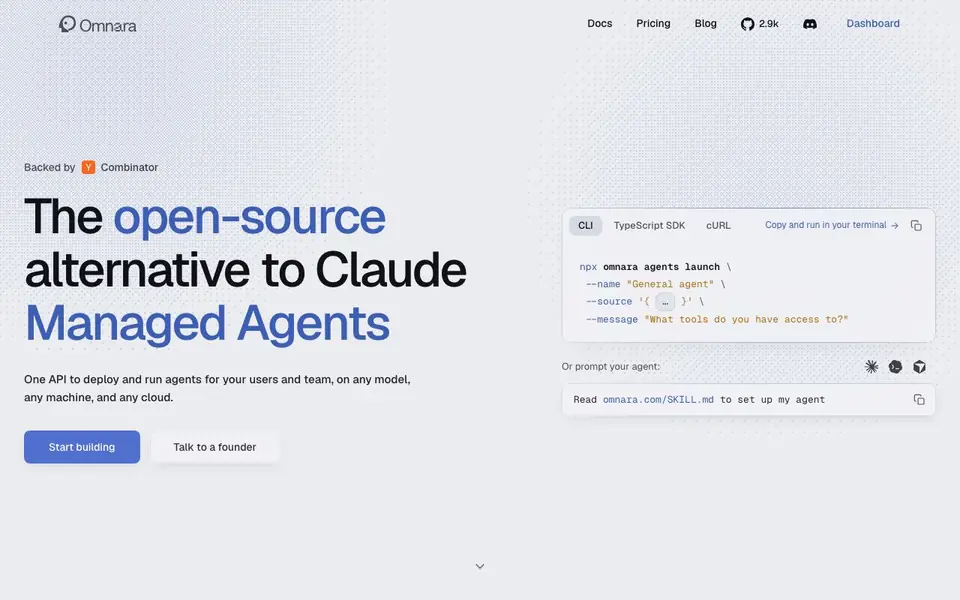
What is Omnara?
Omnara is an open-source platform for deploying and running AI agents in production. It gives you a single API to launch agents for your users and team, without building the underlying infrastructure yourself. You can host it anywhere and keep your data under your control.
You start by installing the CLI or using the TypeScript SDK. Then you launch an agent with a simple command, pointing it to a model and giving it instructions. The platform handles durability, retries, access controls, and integrations, so agents keep working even if a machine fails.
Omnara suits teams that want the speed of a managed agent platform without vendor lock-in. You can use any model, run on any cloud, and self-host if you prefer. The website highlights use cases like agents in product dashboards, internal Slack agents, code review workflows, and interactive CLI experiences.
Omnara features
- Durable Agents: Agents keep their state and resume work even when machines or calls fail.
- Any machine: Run your agents on any infrastructure you choose, not just vendor sandboxes.
- Access Controls: Set permissions for what tools and actions your agents can use.
- Agent-ready APIs: One consistent API works across models, so you can switch providers freely.
- Integrations: Connect agents to tools like Grafana and other services through MCP.
What you can do with Omnara
- Deploy agents inside your product's dashboard for end users.
- Run internal Slack agents that answer team questions and take actions.
- Build specialized code review workflows that check pull requests.
- Create interactive CLI experiences powered by AI agents.
How to get started with Omnara
- Install the CLI or use the TypeScript SDK from Omnara's website.
- Run the npx command to launch your first agent with a name and source.
- Prompt your agent or configure its tools and permissions.
Tips for better results with Omnara
- Start with the CLI command from the docs to launch a basic agent, then test it with a simple prompt before adding complex instructions or tools.
- Use Omnara's access controls to restrict agent actions and tools, especially when deploying agents inside your product or Slack for real users.
- Point Omnara at any model you prefer and switch providers freely using its single API, so you can compare outputs without rewriting your agent code.
- Self-host Omnara on your own infrastructure to keep data under your control, and verify that your deployment handles durability and retries as expected.
- Build a small code review workflow with Omnara first, then expand to other use cases like dashboards or CLI experiences once you confirm reliability.
Omnara pricing
Omnara’s homepage does not list prices. Check omnara.com for current plans.
What to check before you rely on Omnara
- Check the website for pricing details, but note that no pricing is listed, so you must contact the founders to get cost information.
- Verify that your chosen model and cloud provider are supported by Omnara's API, since the site does not list specific compatible providers.
- Confirm how Omnara handles data privacy and access controls in your self-hosted setup, as the website does not detail security certifications or compliance.
- Review the export formats and integration options, like MCP for Grafana, but note that the site does not specify all supported tools or data export methods.
Who Omnara is for
Omnara suits developers, engineering teams, platform teams and product teams. If that is not you, the AI developer platforms below may fit better.
Similar tools compared with Omnara
| Tool | What it is | Pricing |
|---|---|---|
| Omnara | Open-source agent deployment platform | See website |
| SiVideoAPI | Unified API for top AI video models | Freemium |
| OpenSI | AI model comparison and pricing tool | See website |
| OpenRouter | Unified API for many AI models | Freemium |
| Ollama | Run open models locally or cloud | Freemium |
Omnara FAQ
What exactly does Omnara do?
Omnara is an open-source platform that deploys and runs AI agents for you. It gives you one API to launch agents on any model and machine, with built-in durability, access controls, and integrations. You don't build the agent infrastructure yourself.
Is Omnara free to use?
The website does not state pricing details. It mentions a $0 platform fee in a comparison table, but you should check the Pricing page on omnara.com for current plans and costs.
Who is Omnara for?
It is for developers and engineering teams who want to run AI agents in production. It suits teams building internal agents for their company or agentic experiences for their own users, without relying on a single vendor's platform.
Can I self-host Omnara?
Yes. Omnara is open source and designed to be hosted anywhere. You can run it on any cloud or machine you choose, and your data stays yours rather than being held by a managed platform vendor.
Does Omnara connect to Slack or other chat tools?
Yes, Omnara is designed for internal Slack agents that answer team questions and take actions. The website shows an example of an agent updating a Grafana dashboard via Slack. For other chat tools, check the documentation for supported integrations.
Can I use Omnara with my own cloud provider?
Yes, Omnara lets you run agents on any infrastructure you choose, including any cloud. You can self-host it to keep your data under your control. The website emphasizes no vendor lock-in, so you can deploy on your preferred cloud.
What does the free plan of Omnara include?
The website does not mention a free plan or pricing details. It only says you can start building with the CLI or TypeScript SDK. To learn about costs or free tiers, check the pricing page or contact the founders directly.


