
What is Mika?
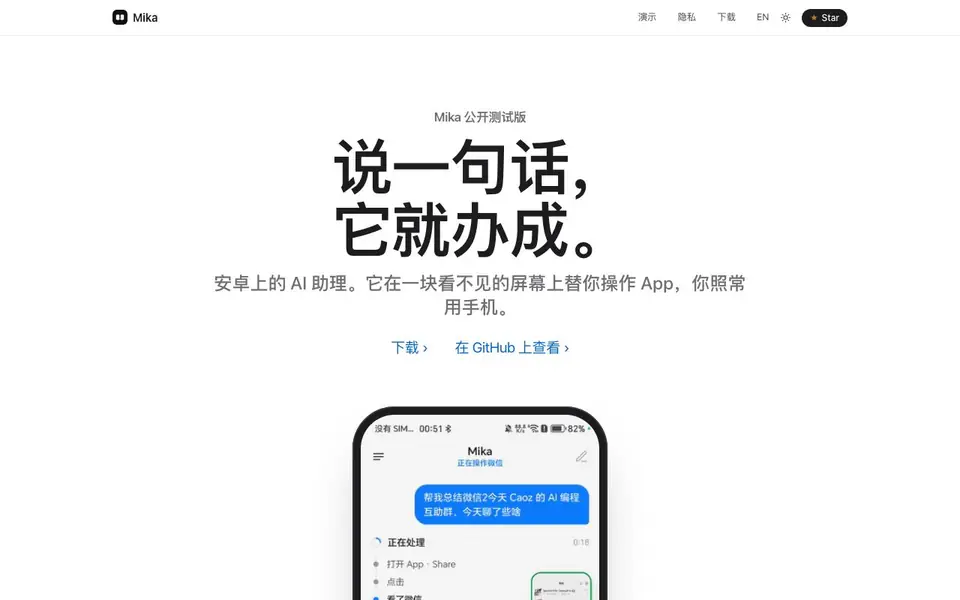
Mika is an open-source, free Android AI assistant. You speak a command, and it operates apps on a hidden background screen, so you can keep using your phone normally. It works without needing app APIs—it sees the screen and taps buttons like a person would.
To use it, you download the APK, connect it to a model of your choice (like DeepSeek, Tongyi, Kimi, OpenAI, or a local model), and say what you want. Mika then runs the app on a separate screen, shows progress when you tap in, and asks before any purchase or payment. Logins and verification codes are marked as needing you.
Your data stays on your phone—API keys and memory are encrypted, and conversations don't leave your device. There's no Mika server in between. It's still an early beta, and automating third-party apps may violate their terms, so check results for important tasks. Requires Android 11+ (12+ for app operation, recommended 14+).
Mika features
- Hidden screen operation: Runs apps on a background screen so your main screen stays free.
- No API needed: Interacts with apps visually, like a human, without requiring app integrations.
- Model flexibility: Connect to DeepSeek, Tongyi, Kimi, OpenAI, or local models.
- Privacy-first: API keys and memory are encrypted; conversations never leave your phone.
- Pre-purchase confirmation: Asks before any order or payment, and flags logins for your input.
What you can do with Mika
- Find a charger under $30 with a 4.5-star rating and add it to your cart.
- Summarize a blogger's recent posts by opening the app and reading through them.
- Compare cheapest direct flights from San Francisco to New York on airline sites.
- Read the top 5 news headlines from a site and speak them out loud with scores.
How to get started with Mika
- Download the APK from the website (Android 11 or above).
- Install and connect a model of your choice, like OpenAI or a local one.
- Say a command, like 'find a cheap charger,' and watch Mika operate the app on a hidden screen.
Tips for better results with Mika
- Connect Mika to a capable model like DeepSeek or OpenAI before testing, since its task quality depends entirely on the model you choose.
- Start Mika with simple, single-step commands like opening an app or reading a headline, then move to multi-step tasks once you see it work reliably.
- Speak clear, specific instructions to Mika, including exact filters like price range or star rating, to reduce mistakes when it taps through screens.
- Check Mika's progress by tapping into its hidden screen during long tasks, so you can catch errors early and stop it before it goes wrong.
- Use Mika for low-risk tasks first, like summarizing posts or comparing prices, and keep important actions like purchases for manual review.
- Keep your phone unlocked and the screen on while Mika works, since it operates on a background screen and may need your input for logins.
- Test Mika with a local model if privacy is your priority, but expect slower responses compared to cloud models like Kimi or Tongyi.
- Review Mika's results after each task, especially for shopping or booking, because it's an early beta and may misread buttons or pages.
Mika pricing
Mika is free to use according to its website.
What to check before you rely on Mika
- Check that your Android version is 11 or higher, and 12 or higher for app operation, since Mika requires specific OS versions to run.
- Verify the model you plan to use with Mika is available and compatible, as the website lists options but does not state setup steps.
- Confirm whether Mika's free label includes unlimited usage, since the site says free but does not specify any limits or paid tiers.
- Review third-party app terms before automating them with Mika, as the site warns that automation may violate their user agreements.
- Check that your data stays on-device as claimed, but note the site does not detail encryption methods or how to verify this yourself.
- Ensure you have a stable internet connection for cloud models, since Mika's performance depends on the model you connect to.
- Test Mika with a non-critical task first, because it's an early beta and the site advises checking results for important operations.
Who Mika is for
Mika suits Android users, Privacy-conscious individuals, Automation enthusiasts and Open-source fans. If that is not you, the AI agents below may fit better.
Similar tools compared with Mika
| Tool | What it is | Pricing |
|---|---|---|
| Mika | Open-source Android AI assistant | Free |
| n8n | AI workflow automation platform | Freemium |
| Lindy | AI teammate for team workflows | Freemium |
| Zapier | AI workflow and agent orchestration platform | Freemium |
| LM Studio | Local AI agent for work and code | See website |
Mika FAQ
What is Mika?
Mika is a free, open-source Android AI assistant that operates apps on a hidden background screen. You speak a command, and it taps buttons and reads screens like a person, so you can keep using your phone.
Is Mika free?
Yes, Mika is free and open-source. The website says 'free, open source.' You download the APK, connect your own model, and start using it without paying.
Which AI models can I use with Mika?
You can connect DeepSeek, Tongyi, Kimi, OpenAI, or local models. Mika doesn't rely on its own server—your phone talks directly to the model you choose.
Does Mika work on any Android phone?
It requires Android 11 or above. Operating apps needs Android 12+, and Android 14+ is recommended. It's still an early beta, so some features may be limited.
Does Mika work on iOS or desktop?
The Mika website only mentions Android. It says Mika requires Android 11 or higher, with Android 12+ needed for app operation and Android 14+ recommended. If you want to know about iOS or desktop versions, check the GitHub page or official documentation for updates.
What can Mika export or connect to besides AI models?
Mika connects to AI models like DeepSeek, Tongyi, Kimi, OpenAI, or local models. The website does not mention exporting data or connecting to other services like calendars or messaging apps. For details on integrations or exports, check the GitHub repository or documentation.
Does Mika require an account to use?
The Mika website does not mention needing an account. It says you download the APK, connect a model, and speak your command. Your data stays on your phone, and there is no Mika server in between. For account requirements, check the GitHub page or app documentation.


