

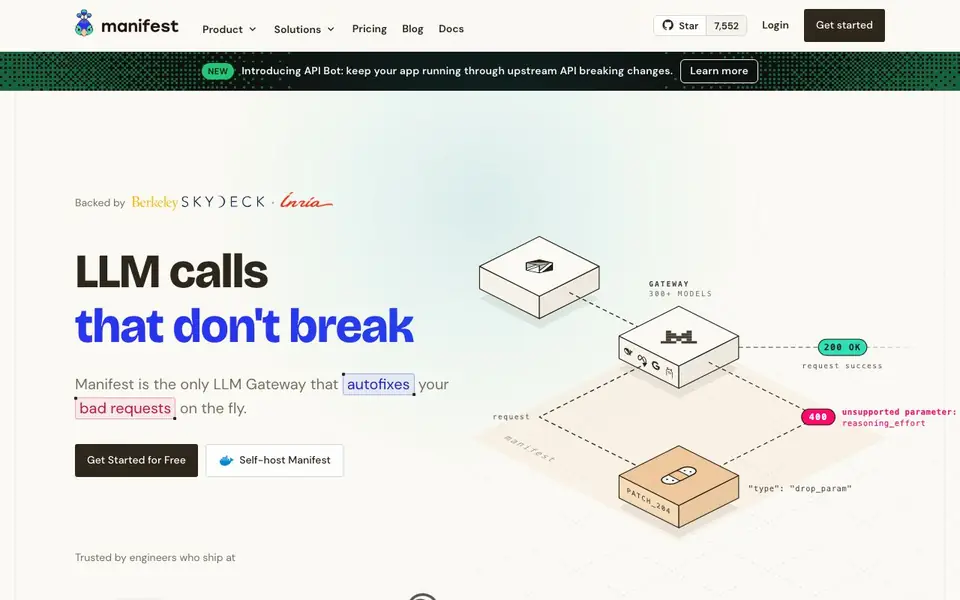
What is Manifest?
Manifest is an open source LLM Gateway that acts as a single endpoint between your AI agents and multiple model providers. It helps you connect to subscription plans, bring-your-own-key providers, and local models like Ollama or LM Studio. The tool focuses on keeping your LLM calls reliable, so your workflows and apps don't break.
You start by pointing your agent to Manifest's OpenAI-compatible endpoint. From there, you configure routes for different models and providers. When a provider goes down, Manifest automatically retries on another one. If a request is malformed, its Autofix agent repairs it on the fly before your code ever sees the error. You can track every request, token, and dollar spent through a visual interface.
Manifest suits AI builders, teams, and platforms that want to manage inference consumption without constant maintenance. You can self-host it with Docker for free, or use the cloud version for easy onboarding. the website says that about 5% of LLM API calls fail in production, and most of those errors are avoidable with this kind of tool.
Manifest features
- Model fallbacks: Automatically retry on another provider when one goes down, keeping your agents running.
- Autofix: Broken requests get repaired on the fly before your agent sees the error.
- Full body logs: Inspect the complete request and response body for every call.
- Self-host: Run the whole LLM router on your infrastructure or your machine, free and open source.
- Cost visualization: See every dollar spent, broken down by agent, key and provider.
What you can do with Manifest
- Route all your AI agent calls through one endpoint to simplify provider management.
- Set up fallbacks so your app stays up when a model provider has an outage.
- Use Autofix to repair malformed requests automatically and avoid downtime.
- Track token usage and spending across your team with detailed logs and dashboards.
- Connect local models like Ollama or LM Studio for requests that should stay on your machine.
How to get started with Manifest
- Sign up for the cloud version or self-host Manifest using Docker.
- Point your agent or harness to Manifest's OpenAI-compatible endpoint.
- Configure routes, add your API keys or subscription plans, and set model parameters visually.
Tips for better results with Manifest
- Start by pointing your agent at Manifest's OpenAI-compatible endpoint, then configure routes for each provider you use. Test one route at a time to confirm the setup works before adding fallbacks.
- Set up model fallbacks in Manifest for your critical providers. When one goes down, Manifest retries on another automatically, so your workflows keep running without manual intervention.
- Use Manifest's Autofix to repair malformed requests on the fly. Enable it for production routes to catch errors before they reach your agent, reducing downtime from avoidable API failures.
- Track your token usage and spending through Manifest's visual interface. Review the logs regularly to spot which agents or providers cost the most, then adjust your routing to stay within budget.
Manifest pricing
Manifest has a free way to start, with paid plans for heavier use. Check manifest.build for current limits and prices.
What to check before you rely on Manifest
- Check whether the freemium plan includes all features you need, like Autofix and full body logs. The website does not list specific limits for the free tier.
- Verify that Manifest supports the providers and local models you use. The site mentions Ollama, LM Studio, and BYOK, but does not list every compatible provider.
- Review the self-hosted Docker setup before relying on it. The website says it is free and open source, but does not state system requirements or maintenance expectations.
Who Manifest is for
Manifest suits AI builders, Teams and startups and Platforms and providers. If that is not you, the AI developer platforms below may fit better.
Similar tools compared with Manifest
| Tool | What it is | Pricing |
|---|---|---|
| Manifest | Open source LLM router and gateway | Freemium |
| SiVideoAPI | Unified API for top AI video models | Freemium |
| OpenSI | AI model comparison and pricing tool | See website |
| OpenRouter | Unified API for many AI models | Freemium |
| Ollama | Run open models locally or cloud | Freemium |
Manifest FAQ
What does Manifest do exactly?
Manifest is an open source LLM Gateway. It gives you one endpoint to route requests to any model provider, adds fallbacks when providers fail, fixes broken requests automatically, and tracks every request, token, and dollar spent.
Is Manifest free to use?
Manifest is fully open source and offers a free self-hosted version based on Docker. There is also a cloud version for easy onboarding. The website does not detail specific pricing for the cloud plan, so check the Pricing page for that.
Who is Manifest for?
It is for AI builders who want to connect subscription plans, BYOK providers, and local models to their harnesses. Teams and startups use it to manage inference consumption, and platforms use it to help their users connect smoothly to models.
Can I use my own API keys with Manifest?
Yes. Manifest supports bring-your-own-key for every provider, so you pay usage directly. It also accepts OAuth tokens for subscription plans and can route to local models like Ollama or LM Studio.
Can Manifest connect to local models like Ollama or LM Studio?
Yes, Manifest can route requests to local models such as Ollama, LM Studio, llama.cpp, or any local server. This lets you decide what stays on your machine and what goes to the cloud. The website highlights this as a key feature for keeping certain requests local.
Does Manifest provide a cloud version or do I have to self-host it?
Manifest offers both options. You can use the cloud version for easy onboarding, or self-host it with Docker for free. The website states that the self-hosted version is fully open source and free to run on your own infrastructure or machine.
What kind of data and usage tracking does Manifest offer?
Manifest provides full body logs, letting you inspect the complete request and response body for every call. It also includes cost visualization, showing every dollar spent broken down by agent, key, and provider. This helps you track token usage and spending across your team.


