

What is magpie?
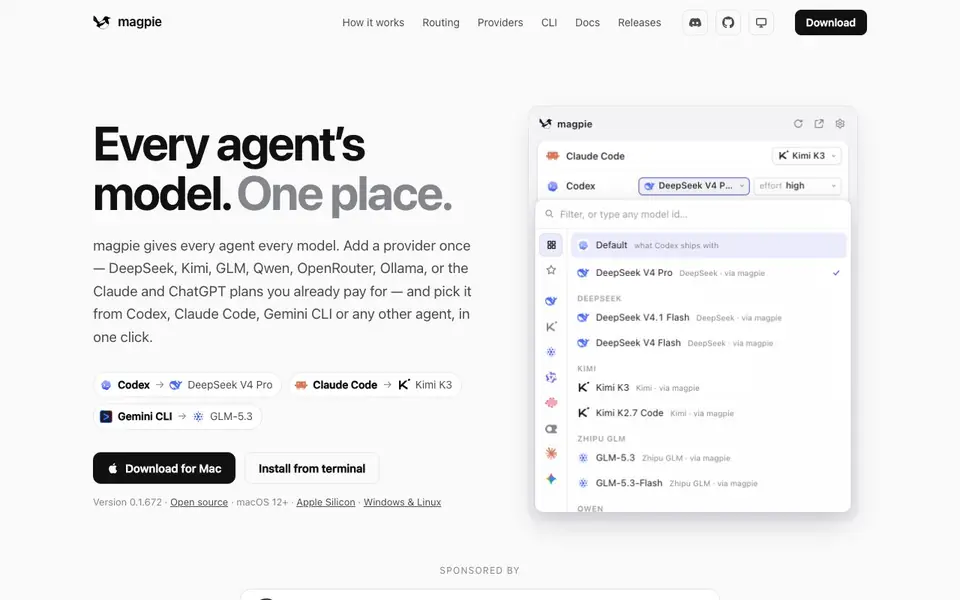
magpie is a local gateway that runs on your Mac and translates between different AI model APIs. It lets you use models from providers like DeepSeek, Kimi, GLM, Qwen, or your existing Claude and ChatGPT subscriptions with agents like Codex, Claude Code, and Gemini CLI. You add a provider once by pasting an API key, then pick that model from any agent's model list in one click.
It works by speaking the API language each agent expects — OpenAI Responses, Anthropic Messages, Google Gemini — and converting requests and responses in both directions, including streaming, tool calls, and reasoning. You can see and change which model each agent uses from the menu bar. magpie rewrites only the config key you change, so the next session uses your new choice.
You can also set up smart routing rules. Tell magpie what each model is for, like "a quick question" or "writing tests," and it sends each turn to the right model automatically. It handles multiple accounts and keys, failing over when one runs out of credit or hits rate limits. The website mentions it is open source and supports macOS 12+, Apple Silicon, with Windows and Linux versions available.
magpie features
- Universal gateway: Speaks OpenAI, Anthropic, and Gemini APIs so any agent can use any model.
- Menu bar control: See and switch each agent's model with one click from the menu bar.
- Subscription sharing: Use your Claude, ChatGPT, or Copilot login as a provider in other agents.
- Smart routing: Assign models to intents like quick questions or test writing, and route turns automatically.
- Failover handling: Automatically switches to another account or key when one is out of credit or rate-limited.
What you can do with magpie
- Use DeepSeek models inside Codex without changing your workflow.
- Route Claude Code turns to Kimi or GLM based on task type.
- Share your ChatGPT Plus subscription with other agents like Goose.
- Manage multiple API keys and subscriptions from one menu bar app.
How to get started with magpie
- Download magpie for Mac from the website or install from terminal.
- Paste an API key or sign in to a provider like Claude or ChatGPT.
- Pick the model you want from any agent's model picker in one click.
Tips for better results with magpie
- Start with one agent and one provider you already use, like Claude Code with your existing Claude plan, to verify magpie translates requests and responses correctly before adding more.
- Use magpie's smart routing to assign models to intents like quick questions or test writing, so each turn goes to the right model automatically without manual switching.
- Check the menu bar regularly to see which model each agent is using, and change it with one click when you need a different model for a specific task.
- Add multiple API keys or subscriptions for the same vendor and enable failover, so magpie switches to another account when one runs out of credit or hits rate limits.
magpie pricing
magpie’s homepage does not list prices. Check usemagpie.ai for current plans.
What to check before you rely on magpie
- Confirm your specific agent version is supported by magpie, since the website lists many agents but does not state compatibility details for every version.
- Verify that your Mac meets the stated requirements of macOS 12+ and Apple Silicon, and check if Windows or Linux builds match your setup.
- Review how magpie handles your API keys and subscription logins, as the website does not detail data storage or privacy practices for local gateway use.
Who magpie is for
magpie suits developers, AI power users and teams using coding agents. If that is not you, the AI developer platforms below may fit better.
Similar tools compared with magpie
| Tool | What it is | Pricing |
|---|---|---|
| magpie | Local AI model gateway for agents | See website |
| SiVideoAPI | Unified API for top AI video models | Freemium |
| OpenSI | AI model comparison and pricing tool | See website |
| OpenRouter | Unified API for many AI models | Freemium |
| Ollama | Run open models locally or cloud | Freemium |
magpie FAQ
What does magpie do?
magpie is a local gateway that lets you use any AI model with any coding agent. It translates between different API formats so agents like Codex and Claude Code can talk to models from providers like DeepSeek, Kimi, and GLM.
Is magpie free?
The website does not state pricing. It mentions the app is open source and available for download, but you would need to check the site or releases page for any paid plans or costs.
Who is magpie for?
It is for developers and AI users who work with multiple coding agents and want to choose the best model for each task. It is especially useful if you already pay for Claude or ChatGPT and want to use those models in other agents.
Can I use my existing subscriptions with magpie?
Yes. If you are signed in to an agent with Claude Pro, ChatGPT Plus, or GitHub Copilot, that login becomes a provider. Its models then show up in other agents' pickers without needing to paste API keys.
Can magpie export or connect to other tools beyond the listed agents?
The magpie website lists many compatible agents, including Codex, Claude Code, Gemini CLI, and others. It does not mention exporting data or connecting to external services beyond these agents. For specific integration questions, check the magpie documentation or releases page for updates.
Does magpie run on Windows or Linux, or only on Mac?
magpie runs on macOS 12+ with Apple Silicon, and the website also mentions Windows and Linux versions are available. So you can use it on those platforms too, not just on a Mac. Check the download section for the latest versions for each operating system.
What does the free plan of magpie include?
The magpie website does not mention any pricing or free plan details. It says the tool is open source, which may imply you can use it freely, but the website does not specify what features are included in a free plan. For pricing information, check the magpie website or its releases page for announcements.


