
What is LMQL?
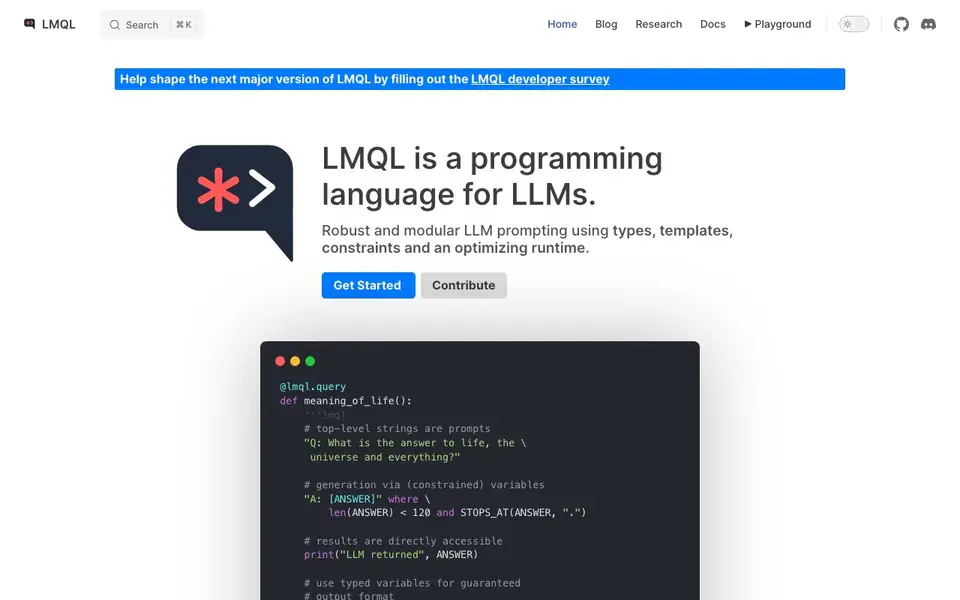
LMQL is a programming language designed for interacting with large language models. It gives you a structured way to write prompts using types, templates, and constraints, so you can build reliable and reusable LLM code. The language runs on an optimizing runtime that helps enforce your rules.
You write prompts as Python-like functions with special syntax. You can define variables, set hard constraints like length or stop tokens, and even specify output types such as integers. The runtime handles the generation, and you can access results directly in your code. This makes it easy to build complex multi-step queries.
LMQL works across different backends, including llama.cpp, OpenAI, and Hugging Face Transformers, so you can switch providers with minimal changes. It supports features like nested queries, tool augmentation, and chatbots. It was created by the SRI Lab at ETH Zurich and is open for contributions.
LMQL features
- Constrained generation: Enforce hard constraints like length limits and stop tokens on model output.
- Typed variables: Specify output formats such as integers or regex patterns for guaranteed structure.
- Python integration: Use Python control flow and string interpolation to build prompts dynamically.
- Multi-backend support: Switch between llama.cpp, OpenAI, and Transformers with one line of code.
- Nested queries: Modularize local instructions and reuse prompt components across your code.
What you can do with LMQL
- Build multi-step prompts that require intermediate answers and final reasoning.
- Generate structured outputs like lists or numbers with guaranteed formats.
- Create portable LLM applications that run on different backends.
- Develop chatbots with tool augmentation and meta prompting capabilities.
How to get started with LMQL
- Install LMQL and set up your preferred backend, such as OpenAI or llama.cpp.
- Write a query using the @lmql.query decorator and define prompts with constraints and types.
- Run your query from Python and access the results directly in your code.
Tips for better results with LMQL
- Use LMQL's typed variables like [NUM: int] to force structured outputs, so you avoid parsing messy text and get clean results directly in your code.
- Write hard constraints with 'where' clauses, such as length limits or stop tokens, to keep LMQL's generation focused and prevent it from running past your intended answer.
- Switch backends in LMQL with a single line of code, so test your prompt on llama.cpp first to save costs before running it on OpenAI or Transformers.
- Break complex tasks into nested queries in LMQL to reuse prompt components and keep each step simple, which improves reliability and makes debugging easier.
LMQL pricing
LMQL’s homepage does not list prices. Check lmql.ai for current plans.
What to check before you rely on LMQL
- Check that your chosen backend, like OpenAI or llama.cpp, is available and configured, since LMQL's website lists support but does not state setup details.
- Verify the exact syntax for constraints and typed variables in LMQL's docs, because the site shows examples but not a full reference for all edge cases.
- Confirm what data is sent to each backend and how it is stored, as the LMQL website does not mention privacy or retention policies for your prompts.
Who LMQL is for
LMQL suits developers, researchers and AI engineers. If that is not you, the AI developer platforms below may fit better.
Similar tools compared with LMQL
| Tool | What it is | Pricing |
|---|---|---|
| LMQL | Programming language for LLM interaction | See website |
| SiVideoAPI | Unified API for top AI video models | Freemium |
| OpenSI | AI model comparison and pricing tool | See website |
| OpenRouter | Unified API for many AI models | Freemium |
| Ollama | Run open models locally or cloud | Freemium |
LMQL FAQ
What is LMQL?
LMQL is a programming language for interacting with large language models. It lets you write prompts with types, constraints, and templates, and it runs on an optimizing runtime to enforce your rules.
Is LMQL free to use?
The website does not state pricing details. LMQL is an open-source project, so you can contribute and likely use it freely, but check the repository or documentation for specific licensing and costs.
Who is LMQL for?
LMQL is for developers and researchers who want more control over LLM outputs. It suits people building complex prompts, needing structured results, or working across multiple model backends.
What can I build with LMQL?
You can build multi-step prompts, chatbots, tool-augmented applications, and portable LLM code. It supports features like nested queries, meta prompting, and type-safe outputs.
What backends can LMQL run on?
LMQL supports llama.cpp, OpenAI, and Hugging Face Transformers backends. You can switch between them with a single line of code, making your LLM code portable. The website lists these three backends, so if you need another provider, check the documentation for updates.
Does LMQL require an account to use?
The website does not mention whether an account is required. Since LMQL is an open-source language, you likely run it locally or with your own API keys. For specific account requirements, check the LMQL documentation or GitHub repository for setup instructions.
Can LMQL export or connect to external tools?
LMQL supports tool augmentation and chatbots, as shown in its features. The website mentions these capabilities but does not list specific external tools or export formats. For details on connecting to your own tools or exporting outputs, refer to the documentation or examples in the LMQL repository.


