

What is Ledge.sh?
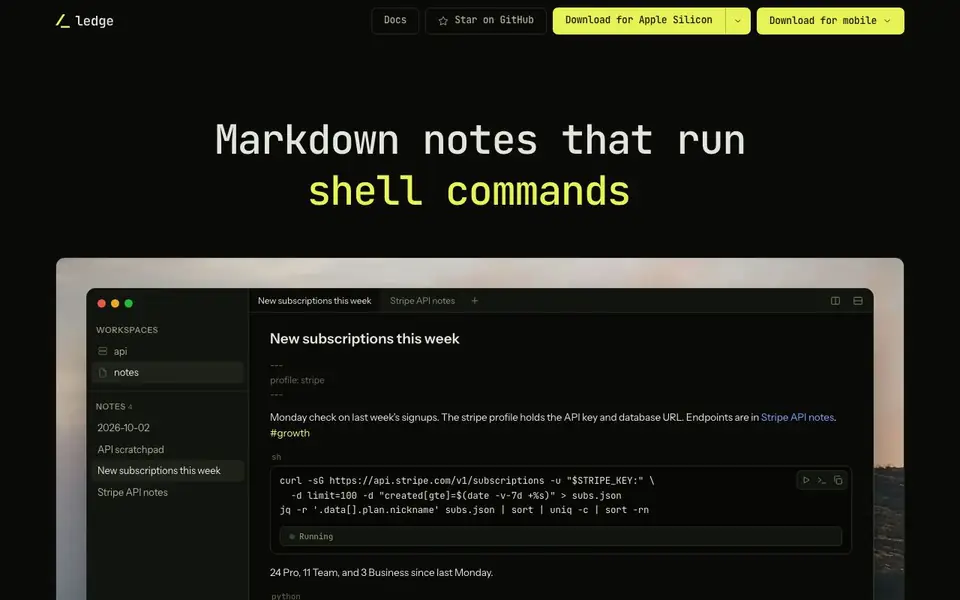
Ledge is a markdown notebook designed for developers and DevOps who keep commands in their notes. You write a note, press ⌘↩ on a code block, and its output streams in beneath it. It runs in your shell, in your project, on your machine, or on a server. Each note has its own persistent shell, so a cd, exported variable, or activated virtualenv carries into the next run.
To get started, you download the app for Apple Silicon or mobile, or install the Ledge Server on a machine over ssh. The server holds the files and runs the shells, while the app on your computer is the window onto it. You can also run blocks on other machines by adding a host line to the frontmatter. No account or service is needed—just ssh.
Ledge is free and open source under Apache-2.0, supporting macOS on Apple Silicon, Linux, Windows 11 with WSL, iPhone and iPad, and Android (beta). It suits developers, DevOps, and anyone who keeps runnable commands in notes and wants to execute them without leaving the document.
Ledge.sh features
- Run code blocks in place: Press ⌘↩ on a code block to run it and stream output beneath it.
- Persistent shell per note: Each note has its own shell, so environment changes carry across runs.
- Terminal drawer: Send a block to a second shell you can keep typing in with ⇧⌘↩.
- Remote server support: Point Ledge at a machine over ssh to keep notes and run shells there.
- Mobile app: Read, edit, and run notes on iPhone and iPad with live preview and search.
What you can do with Ledge.sh
- Run curl commands to fetch API data and see results directly in your notes.
- Execute SQL queries against a database and view the output beneath the block.
- Trigger AI prompts from notes to generate updates or summaries.
- Manage a homelab by running commands like htop on a remote server.
How to get started with Ledge.sh
- Download the Ledge app for Apple Silicon or mobile from the website.
- Write a markdown note and add a code block with a language like sh, python, or sql.
- Press ⌘↩ on the block to run it and see output stream beneath it.
Tips for better results with Ledge.sh
- Start each note with frontmatter that sets cwd and env so your shells begin in the right directory with the right variables, avoiding repeated setup commands.
- Use Ledge's persistent shell per note to keep exported variables and virtualenvs active across blocks, so you can chain commands without redefining context each time.
- Send interactive blocks like sudo prompts or confirmations to the terminal drawer with ⇧⌘↩, then type responses directly in that second shell.
- Run long tasks on a remote server via ssh with Ledge Server, so blocks keep executing even after you close your laptop, and check output later.
Ledge.sh pricing
Ledge.sh is free to use according to its website.
What to check before you rely on Ledge.sh
- Verify your platform is supported: Ledge lists macOS on Apple Silicon, Linux, Windows 11 with WSL, iPhone, iPad, and Android beta, but not Intel Macs.
- Confirm the free plan covers what you need, since the site says free and open source but does not state any limits on notes, blocks, or server usage.
- Check that your ssh setup matches Ledge's model, as it requires direct ssh access to a server and does not mention support for proxies or jump hosts.
- Review the Apache-2.0 license terms before relying on Ledge for proprietary work, since open source licenses can affect how you use and distribute the tool.
Who Ledge.sh is for
Ledge.sh suits developers, devops, system administrators and data analysts. If that is not you, the AI developer platforms below may fit better.
Similar tools compared with Ledge.sh
| Tool | What it is | Pricing |
|---|---|---|
| Ledge.sh | Runnable markdown notes for developers | Free |
| SiVideoAPI | Unified API for top AI video models | Freemium |
| OpenSI | AI model comparison and pricing tool | See website |
| OpenRouter | Unified API for many AI models | Freemium |
| Ollama | Run open models locally or cloud | Freemium |
Ledge.sh FAQ
What can I run in Ledge notes?
You can run shell commands, code in languages like Python, SQL queries, and AI prompts directly in your markdown notes. The output streams in beneath each block.
Is Ledge free to use?
Yes, Ledge is free and open source under the Apache-2.0 license. You can download it for macOS, Linux, Windows, iPhone, and Android without paying.
How does Ledge work with remote servers?
You install Ledge Server on a machine over ssh, and the server holds the files and runs the shells. Your app connects to it, and you can run blocks on that server.
Does Ledge support mobile devices?
Yes, Ledge runs on iPhone and iPad as a window onto a server. The phone holds no notes but can read, edit, and run blocks on the server.
What can Ledge.sh export or connect to?
Ledge.sh runs shell commands, code, SQL, and AI prompts directly in your notes. The website does not mention exporting notes to other formats or connecting to external services beyond running commands on your own machine or a remote server over ssh. Check the docs or GitHub for any export or integration details.
Does Ledge.sh require an account or a service to use?
No, Ledge.sh does not require an account or a service. You download the app for Apple Silicon or mobile, or install the Ledge Server on a machine over ssh. The only thing between you and the server is ssh, and no port needs to be opened. The website states no account or service is needed.
What does the free plan of Ledge.sh include?
Ledge.sh is free and open source under Apache-2.0. The website does not mention any paid plans or limitations, so the free version includes all listed features: running code blocks in place, persistent shell per note, terminal drawer, remote server support, and mobile apps. Check the GitHub repository for any future changes.


