

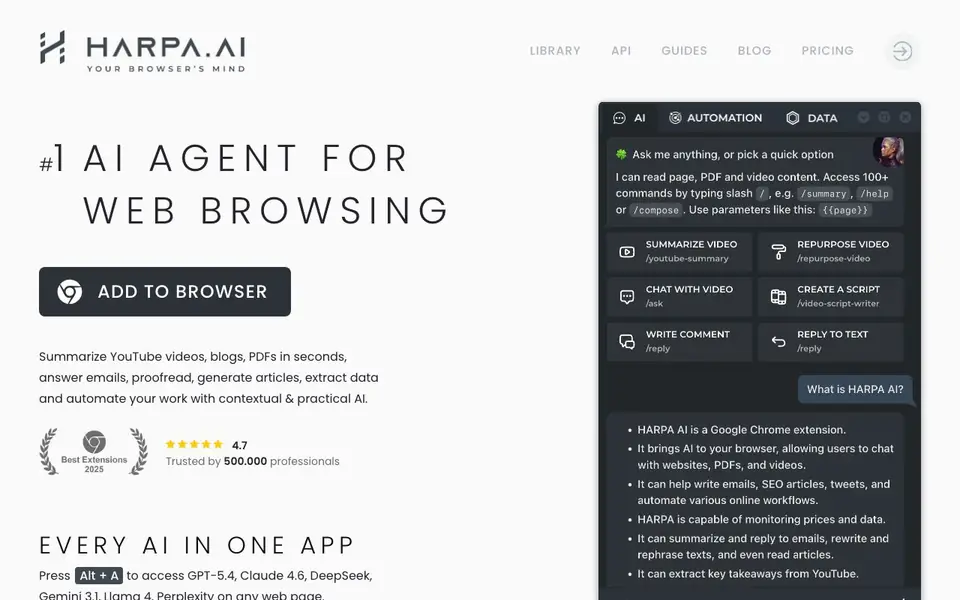
What is HARPA AI?
HARPA AI is a browser extension that puts multiple AI models right inside your Chrome browser. You can access GPT-5.4, Claude 4.6, Gemini 3.1, DeepSeek, Llama 4, and Perplexity on any web page by pressing Alt + A. It combines a browser automation engine with AI to help you work faster across the web.
You can summarize YouTube videos, blogs, and PDFs in seconds. The tool also helps you answer emails, proofread text, generate articles, and extract data from websites. It includes over 100 ready-to-use prompts for tasks like refining your LinkedIn resume, practicing a language, generating social media content, and fixing code. You can also set up page monitors to track changes and price drops on e-commerce sites.
HARPA supports local models like Meta Llama and does not log your conversations and actions. It is GDPR compliant and can be paired with any LLM model of your choice. The extension is trusted by 500,000 professionals and has a 4.7 rating. You can use it for productivity, marketing, learning, copywriting, recruiting, and product development tasks.
HARPA AI features
- Multi-model access: Switch between GPT-5.4, Claude 4.6, Gemini 3.1, DeepSeek, Llama 4, and Perplexity on any webpage.
- YouTube summarizer: Extract key takeaways from long videos, seek information, and jump to specific timestamps.
- Gmail assistant: Categorize incoming emails, summarize long threads, and draft contextual replies in your tone of voice.
- Style mimicry writer: Craft emails, tweets, LinkedIn posts, cover letters, and SEO-optimized articles that match your writing style.
- Page monitoring: Track website changes and get notified whenever pages update, including price drops on e-commerce sites.
What you can do with HARPA AI
- Summarize lengthy YouTube videos to extract key points quickly.
- Draft professional email replies directly within Gmail.
- Generate SEO-optimized articles of unlimited length for your blog.
- Monitor product prices on Amazon, AliExpress, Walmart, and eBay for drops.
- Scrape data from any website and automate workflows with Zapier or Make.com.
How to get started with HARPA AI
- Install the HARPA AI extension from the Chrome Web Store.
- Press Alt + A on any webpage to access the AI assistant.
- Choose from over 100 ready-made prompts or type your own command to start automating tasks.
Tips for better results with HARPA AI
- Press Alt + A on any webpage to open HARPA AI and access multiple models like GPT-5.4 or Claude 4.6, then compare their answers for the same question.
- Use HARPA AI's // shortcuts: press F to finish a draft, G to check grammar, P to rephrase, or T to translate, saving time on routine edits.
- Set up a page monitor in HARPA AI on e-commerce product pages to get notified about price drops or back-in-stock alerts without checking manually.
- For long YouTube videos, use HARPA AI's summarizer to extract key takeaways and jump to specific timestamps instead of watching the full video.
HARPA AI pricing
HARPA AI has a free way to start, with paid plans for heavier use. Check harpa.ai for current limits and prices.
What to check before you rely on HARPA AI
- Check the pricing page on harpa.ai to see what the free plan includes and what features require payment, since the website does not list specific limits.
- Verify that HARPA AI supports the browser and operating system you use, as the website only mentions Chrome and does not state compatibility with others.
- Confirm whether your conversations are logged or stored, since the website claims no logging but you should review their privacy policy for details.
Who HARPA AI is for
HARPA AI suits professionals, marketers, content creators and students. If that is not you, the AI agents below may fit better.
Similar tools compared with HARPA AI
| Tool | What it is | Pricing |
|---|---|---|
| HARPA AI | AI browser agent for web tasks | Freemium |
| n8n | AI workflow automation platform | Freemium |
| Lindy | AI teammate for team workflows | Freemium |
| Zapier | AI workflow and agent orchestration platform | Freemium |
| LM Studio | Local AI agent for work and code | See website |
HARPA AI FAQ
What AI models does HARPA support?
HARPA supports multiple AI models including OpenAI GPT-5.4, Anthropic Claude 4.6, Google Gemini 3.1, DeepSeek, Perplexity, and Meta Llama. You can access them all from one extension without switching between different apps.
Is HARPA free to use?
HARPA offers a freemium model. You can add the extension to your browser and start using basic features. For advanced capabilities like longer articles or more automations, there are paid plans available on their pricing page.
How does HARPA protect my privacy?
HARPA does not log your conversations and actions. It is GDPR compliant and supports local models like Meta Llama. You can also pair it with any LLM model of your choice for added control over your data.
Can HARPA automate tasks across websites?
Yes, HARPA can build AI-powered web automations that navigate websites, extract data, click buttons, and fill forms. You can control your browser remotely from Zapier, Make.com, and n8n to create complex workflows.
Does HARPA AI work on browsers other than Chrome?
HARPA AI is described as a browser extension for Chrome, and the website does not mention support for other browsers. If you need to use it on Firefox, Safari, or Edge, check the official HARPA AI website or its extension store pages for the latest compatibility information.
Can HARPA AI export data or connect to external tools like Zapier or Make.com?
Yes, HARPA AI can scrape data from websites and automate workflows with Zapier, Make.com, and n8n, as stated on the website. It also supports triggering IFTTT chains. For specific export formats or other integrations, the website does not provide details, so check the HARPA AI documentation or support for more information.
What does the free plan of HARPA AI include?
HARPA AI is labeled as freemium, but the website does not specify what the free plan includes or its limitations. To know exactly what you get for free, visit the HARPA AI pricing page or sign up to see the plan details. The website only mentions that it is trusted by many professionals and has a 4.7 rating.


