

What is BLACKBOX.AI?
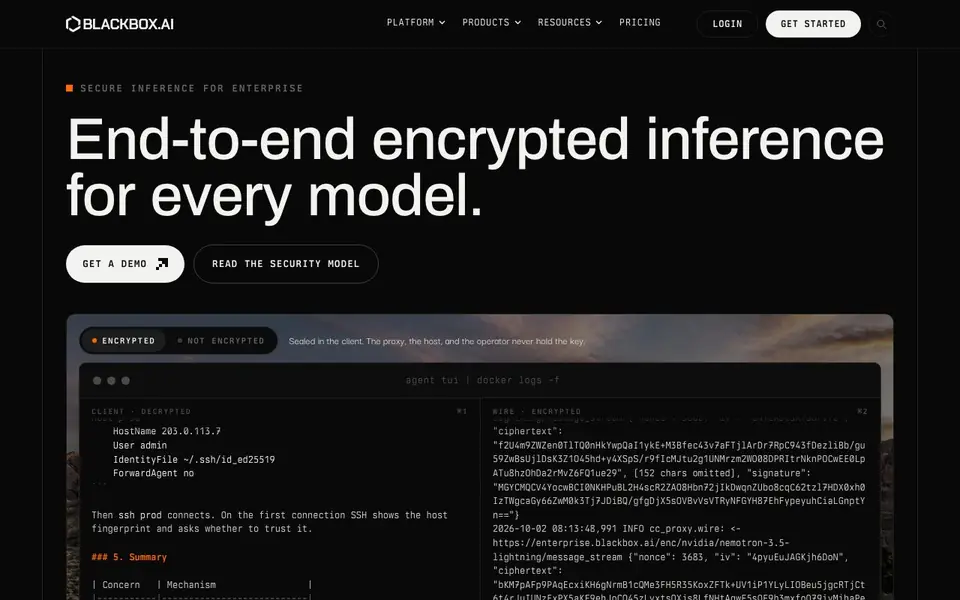
Blackbox is a platform for running AI models with a strong focus on security and privacy. It lets you choose an open-weight model and run it as a dedicated deployment, or route requests to over 300 models through a single endpoint. The main selling point is end-to-end encryption, meaning your data is sealed on your client and only decrypted on your side, so the proxy, host, and operator never see your keys.
You start by selecting a model, like the NVIDIA Nemotron Lightning shown in the demo. Your requests are encrypted before they leave your machine, and the system handles the rest. The platform shows a terminal interface where you can interact with the model, and logs show encrypted traffic flowing to the enterprise endpoint. This setup is designed for teams that need to keep their AI interactions confidential.
Blackbox is aimed at enterprises and developers who need high-trust inference. It suits organizations with strict data privacy requirements, as well as developers who want a secure way to access many models without managing infrastructure. The website emphasizes verified speed and a security model you can read, but it does not detail specific pricing or a free tier.
BLACKBOX.AI features
- End-to-end encryption: Your data is encrypted on your client and decrypted only on your side, so no intermediary holds the key.
- Dedicated deployments: Run the open-weight model you choose as a private, dedicated instance for your organization.
- Model routing: Access over 300 models through a single endpoint, simplifying integration and management.
- Verified speed: The platform emphasizes fast inference, with performance that is verified and reliable.
- Security model documentation: A detailed security model is available for you to read and understand how your data is protected.
What you can do with BLACKBOX.AI
- Deploy a private AI model for your enterprise with full encryption.
- Route requests to multiple models through one secure API endpoint.
- Run sensitive AI workloads where data privacy is critical.
- Integrate a secure AI assistant into your internal tools or workflows.
How to get started with BLACKBOX.AI
- Visit Blackbox's website and request a demo or get started.
- Choose a model from the available open-weight options or set up routing for multiple models.
- Connect your client and start sending encrypted requests through the platform.
Tips for better results with BLACKBOX.AI
- Choose an open-weight model like NVIDIA Nemotron Lightning in Blackbox, then encrypt your requests before they leave your machine to keep your data sealed from the proxy and host.
- Route your requests to over 300 models through Blackbox's single endpoint, but verify the encryption works by checking your logs for encrypted traffic before relying on it for sensitive work.
- Use Blackbox for dedicated deployments when you need a private instance, and confirm the model you select supports your specific use case to avoid mismatched outputs.
- Read Blackbox's security model documentation before integrating it into your workflows, so you understand exactly where your keys are held and how your data is protected end to end.
BLACKBOX.AI pricing
BLACKBOX.AI’s homepage does not list prices. Check blackbox.ai for current plans.
What to check before you rely on BLACKBOX.AI
- Check whether Blackbox's website lists any pricing or free tier details, since it does not state them, so you must contact them for costs.
- Verify the data privacy guarantees match your needs, as Blackbox claims end-to-end encryption, but confirm this applies to all 300 models you route through.
- Confirm which platforms and export formats Blackbox supports, as the website does not detail integration options beyond the terminal interface and API endpoint.
Who BLACKBOX.AI is for
BLACKBOX.AI suits enterprise teams, developers and security-conscious organizations. If that is not you, the AI developer platforms below may fit better.
Similar tools compared with BLACKBOX.AI
| Tool | What it is | Pricing |
|---|---|---|
| BLACKBOX.AI | Encrypted inference platform for enterprise | See website |
| SiVideoAPI | Unified API for top AI video models | Freemium |
| OpenSI | AI model comparison and pricing tool | See website |
| OpenRouter | Unified API for many AI models | Freemium |
| Ollama | Run open models locally or cloud | Freemium |
BLACKBOX.AI FAQ
What is Blackbox?
Blackbox is a platform for AI inference with a focus on security. It lets you run open-weight models as dedicated deployments or route to over 300 models through one endpoint, all with end-to-end encryption.
How does the encryption work?
Your data is encrypted on your client before it leaves your machine. The proxy, host, and operator never hold the decryption key, so only you can see the actual content of your requests and responses.
Who is Blackbox for?
It's designed for enterprises and developers who need high-trust, private AI inference. If you handle sensitive data or have strict compliance requirements, this platform aims to keep your AI interactions confidential.
Is there a free plan or pricing information?
The website does not state specific pricing or a free plan. You can request a demo or get started to learn more about the available options and costs.
What models can I run with Blackbox.ai?
Blackbox.ai lets you choose an open-weight model, like the NVIDIA Nemotron Lightning shown in the demo, and run it as a dedicated deployment. You can also route requests to over 300 models through a single endpoint. The website does not list every model available, so check the platform for the full catalog.
Does Blackbox.ai require an account to use?
The website does not explicitly state whether an account is required to use Blackbox.ai. It shows a login option and a get started button, which suggests you may need to sign up. For the exact requirements, check the login or get started pages on the site.
Can Blackbox.ai integrate with my existing tools or workflows?
Blackbox.ai is designed for developers and enterprises, and it offers a single endpoint for routing requests to over 300 models, which simplifies integration. The website mentions using it as a secure AI assistant in internal tools, but it does not list specific integrations. Check the platform documentation for integration details.


