

What is Atomic Bot?
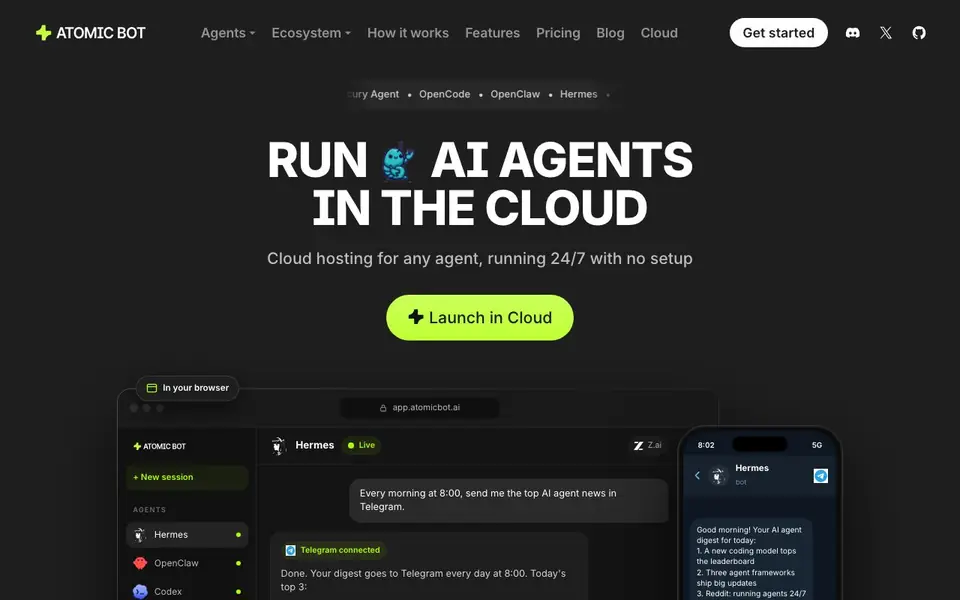
Atomic Bot is a cloud hosting service for AI agents. It lets you launch open-source agents like OpenClaw, Hermes, Codex, and NanoClaw with one click. You don't need to manage servers, terminals, or setups. The agents live in the cloud, so they keep working even when your laptop is off.
You start by picking an agent from the lineup. Each agent runs on a model you choose from labs like Anthropic, OpenAI, Google, DeepSeek, and Qwen. You can switch models anytime without reinstalling. Your dashboard shows spending in plain dollars, not tokens, and estimates how long your balance will last.
You can run multiple agents in one account, each with its own memory and settings. Scale one agent to hundreds of copies if needed. The service suits people who want reliable, always-on agents for tasks like inbox management, coding, research, or Telegram bots. The website mentions a paid balance system, but doesn't list specific prices.
Atomic Bot features
- One-click launch: Start any listed open-source agent in the cloud without setup.
- 24/7 uptime: Agents keep running even when your computer is off or asleep.
- Model switching: Pick from 100+ models and swap them per agent in a click.
- Dollar-based billing: See spend in plain dollars and a forecast of when balance runs out.
- Multi-agent fleet: Run different agents or scale one agent to many copies under one login.
What you can do with Atomic Bot
- Set up a daily AI news digest sent to Telegram every morning.
- Let OpenClaw manage your inbox, calendar, and bookings.
- Use Codex to write code, run it, and review changes.
- Run 300 copies of Hermes side by side for parallel tasks.
How to get started with Atomic Bot
- Go to Atomic Bot's website and click 'Launch in Cloud' or 'Get started'.
- Choose an agent from the lineup, like OpenClaw, Hermes, or Codex.
- Pick a model, add balance, and start messaging your agent via the browser or Telegram.
Tips for better results with Atomic Bot
- Start Atomic Bot with one agent on a single task, like a daily Telegram digest, before scaling to multiple agents or hundreds of copies.
- Switch models per agent in Atomic Bot when a task stalls, since you can swap without reinstalling and compare results across labs.
- Use Atomic Bot's dollar-based dashboard to track spend in plain dollars and check the balance forecast before launching long-running jobs.
- Give each Atomic Bot agent its own memory and settings, so tasks like inbox management stay isolated and don't interfere with each other.
Atomic Bot pricing
Atomic Bot is a paid product. Check atomicbot.ai for current plans and whether a demo or trial is offered.
What to check before you rely on Atomic Bot
- Check whether Atomic Bot's paid balance system has a minimum top-up amount, since the website lists no specific prices or tiers.
- Verify which models from Anthropic, OpenAI, Google, DeepSeek, and Qwen are actually available in Atomic Bot, as the site doesn't list them all.
- Confirm how Atomic Bot handles data privacy and retention for your agents' memories and chats, because the website doesn't state these policies.
Who Atomic Bot is for
Atomic Bot suits developers, automation enthusiasts, productivity users and small teams. If that is not you, the AI agents below may fit better.
Similar tools compared with Atomic Bot
| Tool | What it is | Pricing |
|---|---|---|
| Atomic Bot | Cloud hosting for AI agents | Paid |
| n8n | AI workflow automation platform | Freemium |
| Lindy | AI teammate for team workflows | Freemium |
| Zapier | AI workflow and agent orchestration platform | Freemium |
| LM Studio | Local AI agent for work and code | See website |
Atomic Bot FAQ
What is Atomic Bot?
It's a cloud hosting service for AI agents. You launch open-source agents like OpenClaw, Hermes, and Codex with one click. They run 24/7 in the cloud, so you don't need your own servers or setup.
How does pricing work?
The site shows a balance system in dollars, not tokens. You see spend per agent and a forecast of when your balance runs out. Specific plan prices aren't listed on the homepage, so check the pricing page for details.
Who is Atomic Bot for?
It's for anyone who wants always-on AI agents without managing infrastructure. That includes developers using coding agents, productivity users automating inboxes and calendars, and teams running multiple agents for research or support.
Can I use my own API key?
Yes, the site says you can add your own API key on top of your plan. This lets you use your existing accounts with labs like Anthropic or OpenAI instead of relying solely on Atomic Bot's balance.
Can Atomic Bot connect to Telegram or other messaging apps?
Yes, Atomic Bot can connect to Telegram. The website shows an example where Hermes sends a daily news digest to Telegram, and you can message your agent through Telegram on your phone. Other messaging apps are not mentioned on the site, so check the dashboard or support for more options.
Does Atomic Bot have a free plan or trial?
Atomic Bot uses a paid balance system, and the website does not mention a free plan or trial. You need to add funds to your account to launch agents. For specific pricing or any trial details, check the Pricing page or contact support.
What devices or platforms can I use to access Atomic Bot?
Atomic Bot is a cloud service, so you can access it from any device with a browser. The website shows an interface at app.atomicbot.ai and mentions using it on your phone via Telegram. There is no mention of dedicated mobile apps or desktop software, so browser access is the primary way.


