
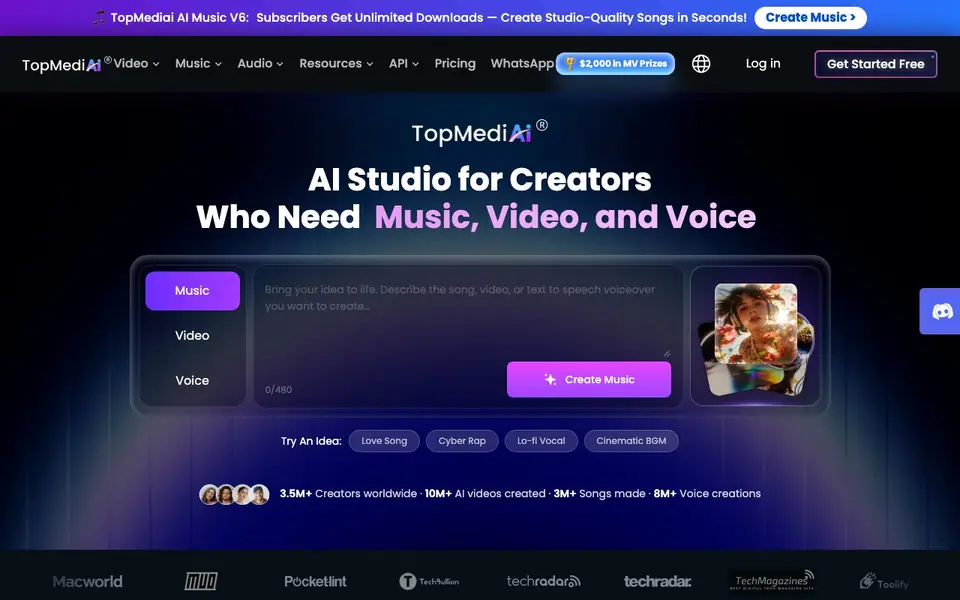
What is TopMediai?
TopMediai is an all-in-one AI studio for creators who need music, video, and voice. You can generate original songs, covers, background music, and soundtracks from text prompts. It also offers text-to-video and image-to-video tools, plus AI voiceovers and dubbing to complete your projects.
Start by picking an idea or typing your own prompt. The platform creates music, visuals, and narration for you. You can then polish the clips and share your finished video. The workflow is designed to be simple, so you don't need editing skills.
TopMediai suits independent artists, social creators, e-commerce sellers, and storytellers. The site mentions over 3.5 million creators worldwide and more than 10 million AI videos created. It also runs challenges with cash prizes, like the AI Dance MV Challenge with $2,000 in prizes.
TopMediai features
- AI Music Generator: Create original songs, loops, and soundtrack ideas from simple text prompts.
- AI Cover: Reimagine existing songs with new vocal styles and creative directions.
- Singing Photo Maker: Turn portraits or character images into singing video moments.
- Text-to-Video: Bring your ideas to life as videos from text descriptions instantly.
- AI Voiceover: Turn scripts into AI narration or character voices to keep viewers engaged.
What you can do with TopMediai
- Generate a love song from a text prompt and turn it into a lyric video.
- Create a product promo video with branded music and AI voiceover.
- Make a story video from a web novel with custom soundtrack and multi-character voices.
- Produce social media shorts with original music matched to the visuals.
How to get started with TopMediai
- Go to the TopMediai website and click Get Started Free.
- Pick a starting idea or type your own prompt for music, video, or voice.
- Generate your content, then polish and share the final video.
Tips for better results with TopMediai
- Start with one of the preset idea prompts like Love Song or Cinematic BGM to see what TopMediai produces, then refine your own text prompt based on that output.
- Use TopMediai's workflow order: generate your music first, then create the video, and add the voiceover last so all elements match your intended mood and pacing.
- For a complete video, combine TopMediai's text-to-video clips with its AI voiceover and original soundtrack, then polish the final cut before sharing.
- Experiment with the AI Cover feature in TopMediai to reimagine an existing song with a different vocal style, which can give your project a fresh angle quickly.
TopMediai pricing
TopMediai has a free way to start, with paid plans for heavier use. Check topmediai.com for current limits and prices.
What to check before you rely on TopMediai
- Check the pricing page on TopMediai to confirm what the free tier includes and what requires a subscription, since the website does not list specific limits.
- Verify whether TopMediai's free plan allows commercial use of generated music and videos, as the site does not state this clearly.
- Confirm the export formats and resolution available for your videos and audio files on TopMediai before starting a project that needs specific specs.
Who TopMediai is for
TopMediai suits independent artists, social creators, e-commerce sellers and storytellers. If that is not you, the AI music generators below may fit better.
Similar tools compared with TopMediai
| Tool | What it is | Pricing |
|---|---|---|
| TopMediai | AI studio for music, video, voice | Freemium |
| AIVA | AI music generation assistant | Freemium |
| Soundraw | AI music generator for royalty-free beats | Freemium |
| Suno | AI music and song generator | Freemium |
| ElevenLabs | AI voice generator and voice agents platform | Freemium |
TopMediai FAQ
What can I create with TopMediai?
You can create original songs, music videos, AI covers, text-to-video clips, image-to-video content, and AI voiceovers. The platform combines these into publish-ready videos.
Is TopMediai free to use?
The site offers a free start option. Subscribers get unlimited downloads for AI music, according to the homepage. For exact pricing details, check the Pricing page on the website.
Who is TopMediai for?
It's for creators like independent artists, social media creators, affiliate marketers, e-commerce sellers, and storytellers who want to make music, videos, and voiceovers without editing skills.
Does TopMediai have an API?
Yes, the website lists an API option in the main menu. This suggests developers can integrate TopMediai's AI capabilities into their own apps, but specific API details are not stated on the homepage.
What can I export or download from TopMediai?
TopMediai lets you download the music, videos, and voiceovers you create. The website mentions subscribers get unlimited downloads, but it does not specify file formats or export options for free users. Check the download buttons in your project workspace for available formats.
Does TopMediai work on mobile devices or only on desktop?
TopMediai is a web-based platform, so you can access it through a browser on most devices with internet. The website does not mention dedicated mobile apps or offline use. For the best experience, use a current browser on a computer or tablet.
What does the TopMediai free plan include?
TopMediai is freemium, meaning you can start for free. The website highlights that subscribers get unlimited downloads, implying free users have limits on downloads or creations. Exact free-plan quotas are not listed on the homepage. Visit the pricing page to see current free tier details.


