

What is LALAL.AI?
LALAL.AI is an AI-powered audio processing suite that started as a vocal remover and grew into a full toolkit for music and voice work. It uses transformer technology to analyze audio and separate vocals from instruments, or isolate specific stems like drums, bass, guitar, and piano. You can also clean up voice recordings by removing noise, echo, and reverb, or change and clone voices for creative projects.
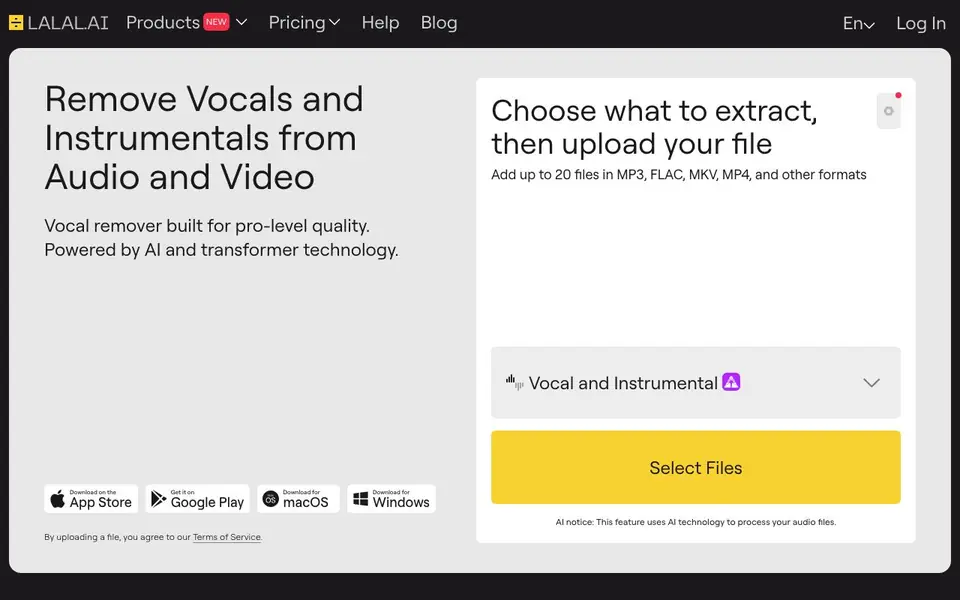
To use it, you choose what to extract—like vocal and instrumental, or lead and backing vocals—then upload your file in formats like MP3, FLAC, MKV, or MP4. The tool processes the audio, and you preview the separated tracks before downloading. You can batch process up to 20 files at once, and the service is available on web, macOS, Windows, iOS, and Android.
LALAL.AI suits musicians, podcasters, video creators, and anyone needing clean stems or voice tracks. The free plan gives you 10 minutes of processing, result previews, and a 200MB upload limit. Paid plans add unlimited minutes in a relaxed queue, faster processing, larger uploads, and features like a VST plugin and API access. The website notes that AI processes your files, and enterprise options exist for secure bulk processing.
LALAL.AI features
- Vocal Remover: Removes vocals from songs to create instrumental tracks or acapellas.
- Stem Splitter: Isolates drums, bass, guitar, piano, and other instruments from a mix.
- Voice Cleaner: Removes background noise and unwanted sounds from voice recordings.
- Voice Changer: Alters your voice for podcasts, videos, or creative use with accent and tonality adjustments.
- Voice Cloner: Clones your voice to produce ad reads and voiceovers quickly.
What you can do with LALAL.AI
- Create karaoke tracks by removing vocals from your favorite songs.
- Extract acapellas for remixes or sampling in music production.
- Clean up voice recordings by removing echo and reverb for clarity.
- Change your voice for character work in podcasts or videos.
How to get started with LALAL.AI
- Choose what to extract, like vocal and instrumental or specific stems.
- Upload your audio or video file in formats like MP3, MP4, or FLAC.
- Preview the separated tracks and download the versions you need.
Tips for better results with LALAL.AI
- Upload the highest quality MP3, FLAC, MKV, or MP4 file you have, since LALAL.AI's separation accuracy improves with clearer source audio and less compression.
- Use LALAL.AI's batch processing to upload up to 20 files at once, then preview each separated track before downloading to confirm the stems meet your needs.
- For voice cleanup, apply LALAL.AI's noise and echo remover on a short clip first, then adjust settings based on the preview to avoid over-processing your recording.
- When using LALAL.AI for voice cloning or changing, record a clean reference voice in a quiet space, as background noise in the sample can degrade the cloned output quality.
LALAL.AI pricing
LALAL.AI has a free way to start, with paid plans for heavier use. Check lalal.ai for current limits and prices.
What to check before you rely on LALAL.AI
- Confirm your file is within the 200MB upload limit on the free plan, since larger files require a paid plan and the website does not list a maximum for paid tiers.
- Check that your audio format is supported, as LALAL.AI accepts MP3, FLAC, MKV, and MP4, but the website does not list all compatible formats explicitly.
- Review the free plan's 10-minute processing limit before starting, and note that the website does not state whether previews expire or how long results are stored.
Who LALAL.AI is for
LALAL.AI suits musicians, podcasters, video creators and audio engineers. If that is not you, the AI music generators below may fit better.
Similar tools compared with LALAL.AI
| Tool | What it is | Pricing |
|---|---|---|
| LALAL.AI | AI vocal remover and stem splitter | Freemium |
| AIVA | AI music generation assistant | Freemium |
| Soundraw | AI music generator for royalty-free beats | Freemium |
| Suno | AI music and song generator | Freemium |
| ElevenLabs | AI voice generator and voice agents platform | Freemium |
LALAL.AI FAQ
How does LALAL.AI remove vocals from a song?
It analyzes the audio and detects which parts are human voice, then separates the vocal layer from instruments like drums, bass, and guitar. You upload a file, the tool processes it, and you can preview and download the vocal or instrumental stems.
Is there a free plan?
Yes, the Starter plan is always free and gives you 10 minutes of processing, free result previews, and a 200MB upload limit. No credit card is needed to try it.
Can I separate lead and backing vocals separately?
Yes, with the Lead/Back Splitter feature you can extract lead vocals, backing vocals, and instrumental, plus a backing+music mix. This is useful for remixes or vocal isolation.
What file formats and devices are supported?
You can upload MP3, FLAC, MKV, MP4, and other formats. The tool works on web browsers, plus you can download apps for macOS, Windows, iOS, and Android.
Does LALAL.AI offer a mobile app for iOS and Android?
Yes, LALAL.AI provides mobile apps for both iOS and Android. You can download them from the App Store and Google Play, respectively. The apps let you use the vocal remover and other tools on your phone or tablet, with the same upload and processing features as the web version.
Can I use LALAL.AI to separate drums, bass, guitar, and piano from a song?
Yes, LALAL.AI's stem splitter can isolate drums, bass, guitar, piano, and more. You can choose to extract specific stems like these from your audio or video files. The tool processes the file and lets you preview and download the separated tracks individually.
What does the free plan on LALAL.AI include exactly?
The free plan on LALAL.AI gives you 10 minutes of processing time, free result previews, and a 200MB upload file limit. You can use it without a credit card. It's enough to test the vocal remover or stem splitter on a short track before deciding to upgrade.


