

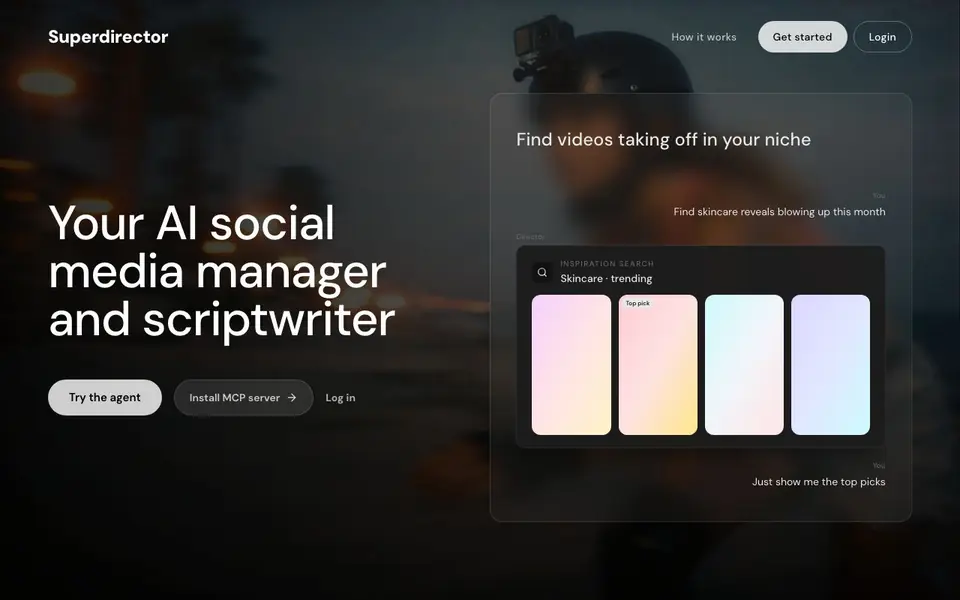
What is Superdirector?
Superdirector is an AI agent that acts as your social media manager and scriptwriter. It scans your niche to find trending videos, analyzes why competitors go viral, and turns winning ideas into scripts and shot plans. You start by pasting a brand, product, profile, or video URL, and the agent reads your account, offer, voice, and competitors.
Once the agent understands your brand, it shows you ranked ideas based on hooks, posts, videos, and competitor patterns. You can inspect these before committing. After setup, you get scripts, shot plans, weekly angles, and creator-ready briefs with shots, notes, and handoff details. The commercial decision comes later, so you can explore freely first.
Superdirector suits content operators, marketers, and creators who want to grow organically on short-form video platforms. The website mentions a managed service and an MCP server for installation, but it doesn't detail pricing or specific platform integrations. You can try the agent directly from the homepage.
Superdirector features
- Niche signal scan: Finds videos taking off in your niche and ranks them by relevance.
- Brand DNA grounding: Uses your brand, product, or profile to tailor search results.
- Competitor analysis: Shows why a competitor went viral so you can learn from patterns.
- Script and storyboard: Generates hooks, setups, and payoffs for your videos.
- Creator-ready briefs: Provides shots, props, talent, and location notes for handoff.
What you can do with Superdirector
- Paste your brand URL to get campaign ideas tailored to your voice.
- Scan your niche to find trending videos and top picks.
- Analyze a competitor's viral video to understand its success.
- Generate a script and shot plan for your next short-form video.
- Plan your weekly content angles on a calendar.
How to get started with Superdirector
- Paste your brand, product, profile, or video URL into the agent.
- Review the ranked ideas and signals the agent finds in your niche.
- Get scripts, shot plans, and creator briefs to hand off for production.
Tips for better results with Superdirector
- Paste a specific brand, product, or profile URL first so Superdirector grounds its niche scan and competitor analysis in your actual voice and offer.
- Inspect the ranked ideas before committing to a script, and use Superdirector's competitor breakdowns to spot patterns you can adapt for your own hooks.
- Use Superdirector to generate creator-ready briefs with shots, props, and location notes, then hand those directly to your video team for faster production.
- Plan your weekly content angles on the calendar inside Superdirector so you maintain a consistent posting rhythm based on the trends it surfaces.
Superdirector pricing
Superdirector’s homepage does not list prices. Check superdirector.app for current plans.
What to check before you rely on Superdirector
- Check the pricing page before relying on Superdirector for regular work, since the website does not state any plan costs or limits.
- Verify which short-form video platforms Superdirector supports, because the site does not list specific integrations or export formats.
- Review the privacy policy to confirm how your brand and competitor data is handled, as the website does not detail data retention or sharing practices.
Who Superdirector is for
Superdirector suits content operators, marketers, social media managers and creators. If that is not you, the AI marketing tools below may fit better.
Similar tools compared with Superdirector
| Tool | What it is | Pricing |
|---|---|---|
| Superdirector | AI social media manager and scriptwriter | See website |
| Copy.ai | AI-native go-to-market platform | See website |
| Jasper | AI agent workspace for marketing teams | Free trial |
| Writesonic | AI search growth and visibility platform | See website |
| Predis.ai | AI ad generator for video, UGC, and images | Freemium |
Superdirector FAQ
What does Superdirector do?
Superdirector is an AI marketing agent that scans your niche, finds trending videos, and turns winning ideas into scripts, shot plans, and creator-ready briefs for organic growth.
How do I get started with Superdirector?
You start by pasting a brand, product, profile, or video URL. The agent reads your account and competitors, then shows ranked ideas. After setup, you get scripts and briefs.
Who is Superdirector for?
It's for content operators, marketers, and creators who want to grow organically on short-form video. The website mentions a managed service for additional support.
Does Superdirector have pricing or a free plan?
The website lists a pricing page but doesn't state specific costs or free options. You'd need to check the pricing section for details.
What can Superdirector export or connect to?
Superdirector provides scripts, shot plans, and creator-ready briefs you can hand off to your team. The website mentions an MCP server for installation, but it does not list specific export formats or integrations with other apps. Check the Help & Docs section for the latest details.
Does Superdirector run on mobile devices?
Superdirector is accessed through its website, so you can use it in a web browser on any device. The site does not mention a dedicated mobile app. For the best experience, try it directly from the homepage on your preferred browser.
Do I need an account to use Superdirector?
The website shows a login option and lets you try the agent from the homepage, but it does not clearly state whether an account is required for initial use. You can start by pasting a brand or profile URL to explore the workflow. For specifics, check the Help & Docs.


