

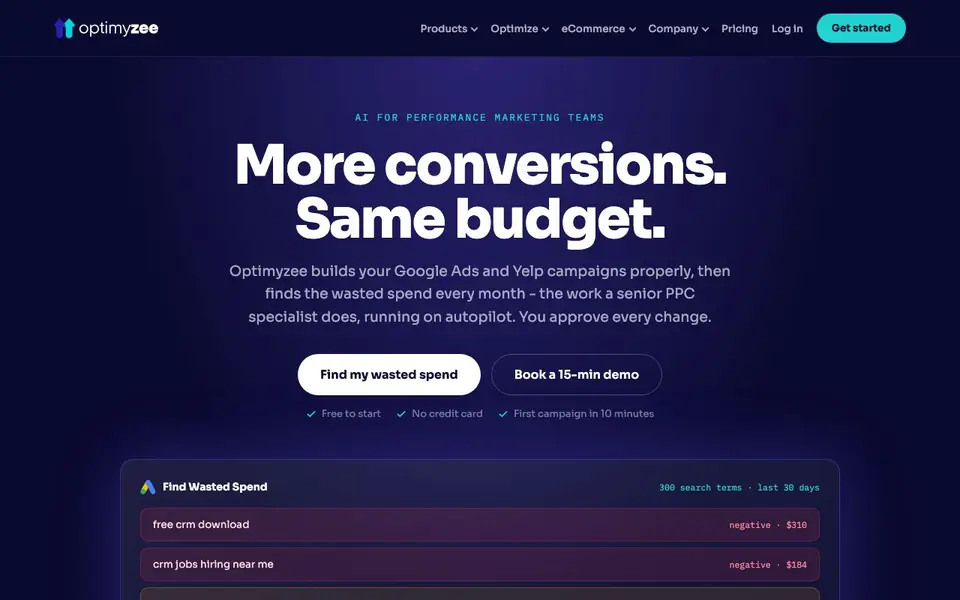
What is Optimyzee?
Optimyzee is an AI-powered tool for performance marketing teams that manages Google Ads, Yelp Ads, and eCommerce campaigns. It builds structured campaigns from a URL, then each month classifies hundreds of search terms to find wasted spend. The tool works like a senior PPC specialist on autopilot, but you hold the approval for every change before anything is published.
You start by connecting your accounts—Google Ads, Yelp, Merchant Center, Shopify, or WooCommerce—which takes about a minute. Optimyzee then analyzes your campaigns and presents findings: wasted queries, weak ads, missing assets, and structure gaps, each with reasoning. You can edit or reject any suggestion, and once approved, changes go straight into the platform without CSV exports or copy-paste.
It suits agencies and in-house marketers managing multiple accounts, especially in local services like roofing or HVAC. The website notes it is free to start with no credit card, and your first campaign can be ready in 10 minutes. It also flags accounts that may be at risk of churn, helping you keep clients before they cancel.
Optimyzee features
- Find Wasted Spend: Classifies 300 real search terms monthly as negatives, observe, or new keywords.
- Negative Keywords: Generates new negatives from your terms plus Keyword Planner before spend happens.
- Responsive Search Ads: Finds ad groups with no active RSA or poor performers and writes replacements.
- Ad Assets: Generates sitelinks, callouts, snippets, call, and promotion assets from your campaign.
- Weather Triggers: Moves HVAC budgets with temperature forecasts for local service advertisers.
What you can do with Optimyzee
- Clean up Google Ads accounts by adding negative keywords from real search terms.
- Build a structured search campaign from a URL in minutes for a new client.
- Manage Yelp Ads and Google Ads in one workspace for local service businesses.
- Generate Performance Max asset groups from your Merchant Center feed.
How to get started with Optimyzee
- Connect your Google Ads, Yelp, Merchant Center, Shopify, or WooCommerce account.
- Review the findings: wasted queries, weak ads, missing assets, and structure gaps.
- Edit or reject any suggestion, then publish approved changes directly to the platform.
Tips for better results with Optimyzee
- Connect your Google Ads, Yelp, Merchant Center, Shopify, or WooCommerce accounts first, so Optimyzee can analyze your actual campaign data and generate relevant findings for your specific accounts.
- Review every suggestion Optimyzee makes before approving, since you hold the final say. Edit or reject any keyword, ad, or asset that doesn't fit your goals to keep full control.
- Use Optimyzee's monthly classification of 300 search terms to spot wasted spend early. Check the negative, observe, and new keyword labels each month to refine your targeting.
- Train Optimyzee on your vertical, like roofing or HVAC, so its industry-specific logic correctly judges intent. This helps it avoid misclassifying terms like 'cost' for your business.
Optimyzee pricing
Optimyzee has a free way to start, with paid plans for heavier use. Check optimyzee.com for current limits and prices.
What to check before you rely on Optimyzee
- Check whether the freemium plan includes all features you need, like Yelp Ads management or weather triggers, since the website does not list what the free tier covers.
- Verify that Optimyzee supports your specific platforms, such as Google Ads, Yelp, Shopify, or WooCommerce, before relying on it for your campaigns.
- Confirm how your data is handled and whether you can export your campaign changes, as the website does not state data privacy policies or export formats.
Who Optimyzee is for
Optimyzee suits performance marketers, PPC specialists, agencies and eCommerce advertisers. If that is not you, the AI marketing tools below may fit better.
Similar tools compared with Optimyzee
| Tool | What it is | Pricing |
|---|---|---|
| Optimyzee | AI PPC optimization with human approval | Freemium |
| Copy.ai | AI-native go-to-market platform | See website |
| Jasper | AI agent workspace for marketing teams | Free trial |
| Writesonic | AI search growth and visibility platform | See website |
| Predis.ai | AI ad generator for video, UGC, and images | Freemium |
Optimyzee FAQ
Is Optimyzee free to use?
The website says it is free to start with no credit card required. It does not state details about paid plans, so you would need to check the pricing page for full information.
What platforms does Optimyzee work with?
It works with Google Ads, Yelp Ads, Shopify, WooCommerce, and Google Merchant Center. Meta is listed as coming soon. You can manage Google Ads and Yelp in one workspace.
How does Optimyzee handle campaign changes?
Optimyzee proposes changes, and you approve each one before anything is published. You can edit or reject every keyword, ad, asset, and negative. Approved changes go straight into the platform without CSV exports.
Who is Optimyzee best for?
It is built for performance marketing teams and agencies managing multiple accounts. It is especially useful for local services like roofing, HVAC, and plumbing, and for eCommerce advertisers using Shopify or WooCommerce.
Does Optimyzee require a credit card to start using it?
No, Optimyzee is free to start and does not require a credit card. You can connect your accounts and get your first campaign ready in about 10 minutes. The website does not mention any trial period or payment details beyond the freemium pricing label, so check the pricing page for full plan details.
Can Optimyzee export data or integrate with tools like Google Sheets or Zapier?
Optimyzee publishes approved changes directly into your connected platforms, so you do not need CSV exports or copy-paste. The website does not mention exporting data to external tools like Google Sheets or Zapier. For specific integration capabilities, check the integrations section on the Optimyzee website.
Does Optimyzee work on mobile devices or is it desktop-only?
Optimyzee is a web-based platform, so you can access it from any device with a browser, including mobile phones and tablets. The website does not mention dedicated mobile apps. For the best experience, use a modern browser on your preferred device. Check the Optimyzee website for any platform-specific recommendations.


