

What is MusicMake.ai?
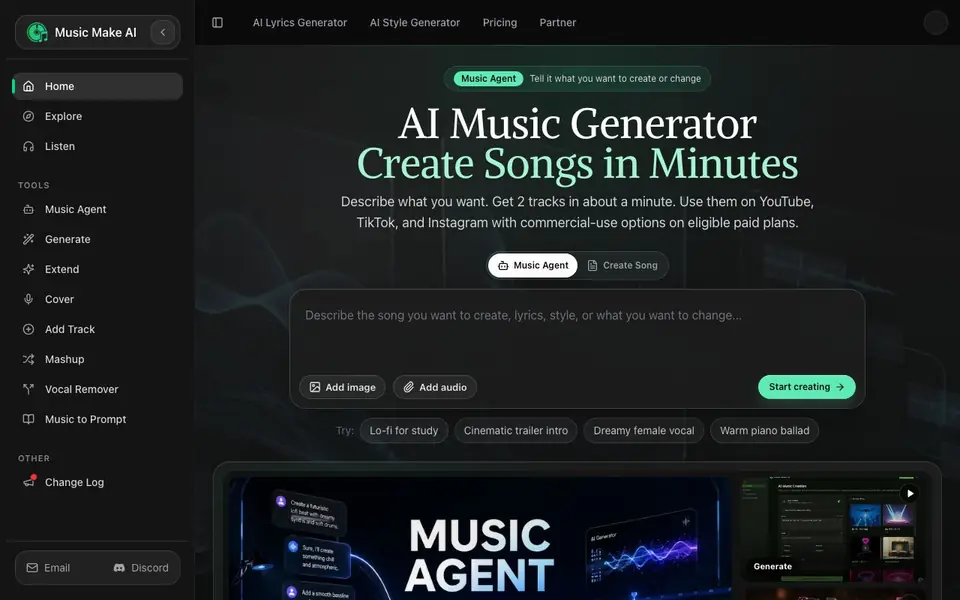
MusicMake.ai is an AI music generator that turns your ideas into finished tracks in about a minute. You describe what you want in plain language, and it produces two songs you can pick from. The tool is built for creators who need music for videos, ads, podcasts, or games without learning music theory or expensive software.
You start by typing a description, adding lyrics, or uploading audio. The AI handles the rest, generating tracks you can download and use. If you want to change something, the Music Agent lets you describe the result you want, and it picks the right tool automatically. You can also use fine-control tools directly to create covers, extend songs, remove vocals, or make mashups.
The service offers commercial-use options on eligible paid plans, so you can use the music in videos, ads, or client projects. There is also a community where you can listen to real songs and start your own version from a direction that already feels close. The website does not list specific pricing details, so check the Pricing page for current plans.
MusicMake.ai features
- Music Agent: Describe the song you want and it picks the right generation, edit, or cover tool for you.
- Generate: Create two tracks in about a minute from a text prompt, lyrics, or audio.
- Cover: Turn an existing song into a new version with a different style or voice.
- Vocal Remover: Separate vocals from a track to get an instrumental version.
- Extend: Make a track longer by adding sections or adjusting the intro, length, or energy.
What you can do with MusicMake.ai
- Create background music for YouTube, TikTok, or Instagram videos.
- Produce a brand jingle for a marketing campaign from a simple idea.
- Build a calm intro or loop for a podcast or wellness session.
- Make a battle theme or menu loop for a game from a scene prompt.
How to get started with MusicMake.ai
- Describe what you want in plain language, like texting a friend.
- Let the AI generate two finished tracks for you to choose from.
- Download your chosen track and use it according to your plan and license terms.
Tips for better results with MusicMake.ai
- Describe the mood, tempo, and instruments in plain language, like texting a friend, to get tracks that match your vision. MusicMake.ai works best with specific directions.
- Use the Music Agent to refine a track by telling it what you want changed, such as a shorter intro or more energy, instead of regenerating from scratch.
- Start from a community song that feels close to your goal and use it as a direction for your own version. This saves time and gives you a proven starting point.
- For real projects, generate multiple tracks and compare them. MusicMake.ai gives you two options per prompt, so pick the best fit and then use Extend or Cover to adapt it.
MusicMake.ai pricing
MusicMake.ai has a free way to start, with paid plans for heavier use. Check musicmake.ai for current limits and prices.
What to check before you rely on MusicMake.ai
- Check the Pricing page for current plan costs and what the freemium tier includes, since the website does not list specific pricing details.
- Verify whether your chosen plan includes commercial-use rights, as the site says eligible paid plans offer them but does not specify which ones.
- Confirm the download formats and license terms before using a track in client work, as the website does not state export file types or full license restrictions.
Who MusicMake.ai is for
MusicMake.ai suits content creators, marketers, podcasters and game developers. If that is not you, the AI music generators below may fit better.
Similar tools compared with MusicMake.ai
| Tool | What it is | Pricing |
|---|---|---|
| MusicMake.ai | AI music and song generator | Freemium |
| AIVA | AI music generation assistant | Freemium |
| Soundraw | AI music generator for royalty-free beats | Freemium |
| Suno | AI music and song generator | Freemium |
| ElevenLabs | AI voice generator and voice agents platform | Freemium |
MusicMake.ai FAQ
How fast can I generate a song?
You get two tracks in about a minute after describing what you want. The AI does all the work, so you just pick your favorite and download it.
Can I use the music commercially?
Eligible paid plans include commercial-use options, so you can use the music in videos, ads, or client projects according to your plan and license terms. Free plan details are not specified on the website.
What can I do with the Music Agent?
The Music Agent lets you describe the result you want, and it picks the right tool automatically. It can generate, extend, cover, add tracks, or remove vocals without you choosing a tool yourself.
Do I need music knowledge to use this?
No. You just describe what you want like you are texting a friend, and the AI handles everything. No music theory or expensive software is needed.
What file formats can I export from MusicMake.ai?
The MusicMake.ai website does not specify the exact file formats for downloads. To see what formats are available, check the Pricing or Help pages on the site. You can likely download your generated tracks directly after creation, but the site doesn't list the technical details.
Does MusicMake.ai have a free plan and what does it include?
MusicMake.ai is labeled as freemium, meaning there is a free tier, but the website does not list specific details about what the free plan includes. For current information on free versus paid features, visit the Pricing page on the MusicMake.ai site.
Can I use MusicMake.ai on my phone or tablet?
The MusicMake.ai website does not mention whether it works on mobile devices or tablets. It appears to be a web-based tool, so you may be able to access it through a browser on any device, but the site doesn't confirm this. Check the site's help or FAQ for device compatibility details.


