

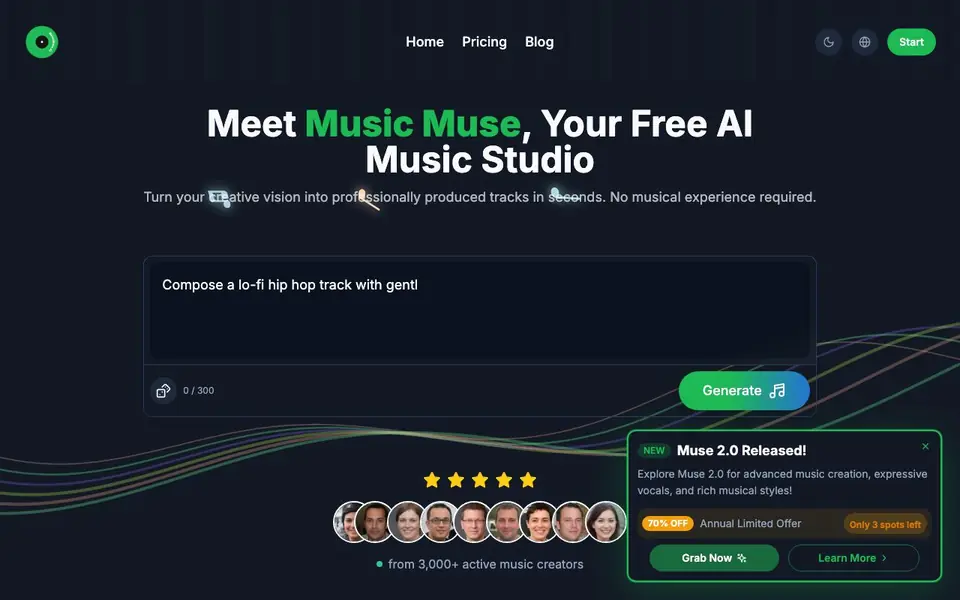
What is Music Muse AI?
Music Muse is an AI music studio that turns your ideas into professionally produced tracks. You describe the mood, style, genre, or lyrics in plain language, and the AI creates a complete song with arrangement and mixing. It supports many genres, from lo-fi hip hop to progressive metal and cinematic soundtracks.
To get started, you type a description of the music you want, such as "Create an upbeat pop song about summer" or "Generate a relaxing piano melody." The AI analyzes your input and generates a track in real time. You can preview it, make adjustments, or create variations until you are happy with the result.
The tool is designed for anyone, whether you are a musician or a complete beginner. You can export your tracks in multiple formats for streaming or your own projects. The website shows examples from thousands of active creators, suggesting a lively community where you can share your music.
Music Muse AI features
- One-prompt creation: Describe your musical vision in natural language and get a complete track in seconds.
- Lyrics to symphony: Turn your written lyrics into a full musical piece with matching melody and harmony.
- Multi-genre support: Create across genres from classical to electronic and everything in between.
- Smart arrangements: Get intelligent suggestions and automatic harmonization to help structure your music.
- Easy sharing and export: Share with the community or export in multiple formats for streaming or projects.
What you can do with Music Muse AI
- Create a lo-fi hip hop track by describing the mood and style.
- Turn your original lyrics into a complete song with matching music.
- Generate a cinematic soundtrack for a video or film project.
- Overcome writer's block with AI-powered creative suggestions.
How to get started with Music Muse AI
- Describe your musical vision using natural language, including mood, genre, or lyrics.
- Let the AI generate your track in real time with professional arrangement and mixing.
- Refine the track with simple controls, generate variations, and export in high-quality formats.
Tips for better results with Music Muse AI
- Describe the mood, genre, tempo, and instruments in your prompt for Music Muse, like 'melancholy lo-fi at 70 BPM with rain sounds,' to get a track that matches your vision.
- Start with a short prompt, preview the result, then ask Music Muse for variations or adjustments to refine the arrangement, mixing, or style until you are satisfied.
- Turn your written lyrics into a full song by pasting them into Music Muse and specifying the genre and emotion, so the AI can match melody and harmony to your words.
- Use Music Muse to overcome writer's block by generating a rough track from a simple idea, then build on it or export it as a starting point for your own production.
- checks
Music Muse AI pricing
Music Muse AI has a free way to start, with paid plans for heavier use. Check musicmuse.ai for current limits and prices.
What to check before you rely on Music Muse AI
- Check whether the free plan includes commercial rights or requires attribution for exported tracks, since the website does not state licensing terms.
- Verify the exact export formats and quality available on the free tier, because the site only says 'multiple formats' without listing them.
- Confirm if your generated tracks are stored publicly or shared by default, as the site highlights a community but does not state privacy settings.
- checks
Who Music Muse AI is for
Music Muse AI suits musicians, songwriters, content creators and beginners. If that is not you, the AI music generators below may fit better.
Similar tools compared with Music Muse AI
| Tool | What it is | Pricing |
|---|---|---|
| Music Muse AI | AI song and music generator | Freemium |
| AIVA | AI music generation assistant | Freemium |
| Soundraw | AI music generator for royalty-free beats | Freemium |
| Suno | AI music and song generator | Freemium |
| ElevenLabs | AI voice generator and voice agents platform | Freemium |
Music Muse AI FAQ
Do I need musical experience to use Music Muse?
No. The website states that no musical experience is required. You simply describe your idea in natural language, and the AI handles the complexity of creating the track.
Is Music Muse free to use?
The website says you can start making music for free and calls itself a free AI music studio. There is also a pricing page, so it likely offers paid plans as well, but the site does not detail them here.
What genres can I create with Music Muse?
The website says it supports multiple genres, from classical to electronic and everything in between. Examples shown include lo-fi, pop, hip-hop, progressive metal, blues, and cinematic.
Can I use my own lyrics with Music Muse?
Yes. The site describes a 'Lyrics to Symphony' feature that analyzes the emotion, rhythm, and meaning of your lyrics to create matching music.
Can I export tracks from Music Muse AI, and what formats are available?
Yes, Music Muse AI lets you export your tracks in multiple formats for streaming or your own projects. The website does not list the specific formats, so check the app or pricing page for details on available export options.
Does Music Muse AI have a mobile app or desktop software?
Music Muse AI is a web-based tool, so you can use it in your browser on any device with internet access. The website does not mention a dedicated mobile app or desktop software, so check the site for any updates on platform availability.
What does the free plan of Music Muse AI include, and are there limits?
Music Muse AI is freemium, meaning you can start for free. The website does not specify what the free plan includes or any usage limits, so check the pricing page for details on free features and paid upgrades.


