

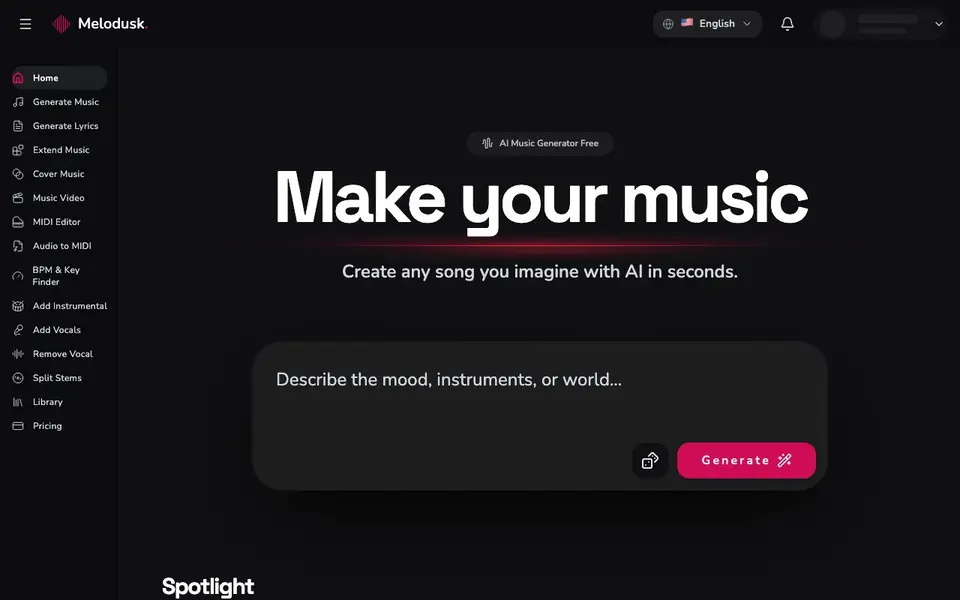
What is Melodusk - AI Music Maker?
Melodusk is an AI music generator that creates original tracks from your text descriptions. You describe the mood, genre, instruments, or scenario, and the AI composes a complete song with melodies, harmonies, rhythms, and even vocals. It handles all the complex production work, so you don't need musical training.
Getting started is simple. First, describe the music you want in natural language, like "upbeat electronic dance music with piano melodies." Then customize your track by choosing vocals or instrumental, picking a style from over 100 genres, and adjusting settings like song length and energy. Finally, click generate and download your track in high-quality formats in under two minutes.
Melodusk suits content creators, marketers, and hobbyists who need royalty-free music for videos, ads, or personal projects. The platform also includes studio tools like vocal removal, stem splitting, and audio-to-MIDI conversion. The website mentions a free option, but doesn't specify exact limits or paid plan details.
Melodusk - AI Music Maker features
- Text-to-music generation: Describe any song idea in natural language and get a complete track.
- Genre variety: Supports over 100 music styles from classical to EDM.
- Vocal control: Choose between instrumental-only or tracks with AI vocals.
- Customization options: Adjust song length, energy level, and instrumentation.
- Studio tools: Remove vocals, split stems, and convert audio to MIDI.
What you can do with Melodusk - AI Music Maker
- Create background music for YouTube videos and streams.
- Generate jingles and soundtracks for marketing campaigns.
- Produce original songs for personal music projects.
- Extract acapella or karaoke versions from existing tracks.
How to get started with Melodusk - AI Music Maker
- Describe the music you want in natural language, including mood, genre, and instruments.
- Customize your track by choosing vocals or instrumental and adjusting settings.
- Click generate, preview the result, and download in high-quality formats.
Tips for better results with Melodusk - AI Music Maker
- Describe your track with specific details like mood, genre, and instruments in one sentence, for example 'upbeat electronic dance music with piano melodies', to guide Melodusk's composition accurately.
- Use Melodusk's customization options to set song length, energy level, and instrumentation after your initial description, refining the output to match your project's needs before generating.
- Experiment with Melodusk's studio tools like vocal removal or stem splitting on generated tracks to adapt them for different uses, such as creating instrumental versions or karaoke backups.
- Generate multiple variations of the same prompt in Melodusk by tweaking your description or settings each time, then compare results to pick the best fit for your video or ad.
Melodusk - AI Music Maker pricing
Melodusk - AI Music Maker has a free way to start, with paid plans for heavier use. Check melodusk.ai for current limits and prices.
What to check before you rely on Melodusk - AI Music Maker
- Check whether the free option on Melodusk includes enough generations or downloads for your project, since the website does not state specific limits.
- Verify if Melodusk's paid plans and pricing are listed anywhere, as the site mentions freemium but provides no details on costs or tiers.
- Confirm that Melodusk's output formats and licensing terms for royalty-free use are clear before relying on tracks commercially, as the website does not specify these.
Who Melodusk - AI Music Maker is for
Melodusk - AI Music Maker suits content creators, musicians, marketers and hobbyists. If that is not you, the AI music generators below may fit better.
Similar tools compared with Melodusk - AI Music Maker
| Tool | What it is | Pricing |
|---|---|---|
| Melodusk - AI Music Maker | AI music generator from text | Freemium |
| AIVA | AI music generation assistant | Freemium |
| Soundraw | AI music generator for royalty-free beats | Freemium |
| Suno | AI music and song generator | Freemium |
| ElevenLabs | AI voice generator and voice agents platform | Freemium |
Melodusk - AI Music Maker FAQ
Is Melodusk free to use?
The website mentions free music generation, but it doesn't specify exact limits or whether there are paid plans. Check the Pricing page on their site for current details.
Do I need musical skills to use Melodusk?
No. The platform is designed for everyone, and you just describe what you want in plain language. The AI handles composition, arrangement, and production automatically.
Can I use the music commercially?
Yes. Melodusk states that all tracks are royalty-free with commercial use rights, so you can use them in monetized content without copyright issues.
What genres can Melodusk generate?
The platform supports over 100 music styles, including pop, rock, jazz, classical, hip-hop, and EDM. You can also specify instruments, tempo, and mood in your description.
What audio formats can I download from Melodusk?
Melodusk lets you download your generated tracks in high-quality formats, but the website does not specify which exact formats are available. For the full list of supported download formats, check the Melodusk website or contact their support team.
Can I use Melodusk on my mobile device or desktop?
Melodusk is a web-based platform, so you can access it from any device with a browser, including smartphones, tablets, and computers. The website does not mention dedicated mobile apps, so using the browser version is the way to go.
Does Melodusk offer a free plan, and what does it include?
Melodusk has a free option, but the website does not specify the exact limits or features of the free plan. To find out what you can do for free, visit the Melodusk pricing page or sign up to see the available options.


