

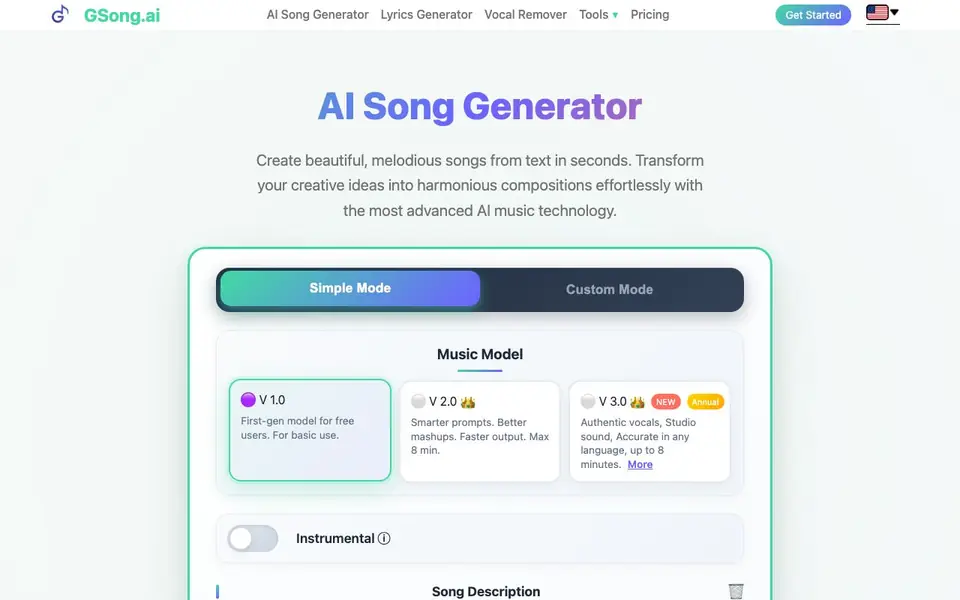
What is GSong.ai?
GSong.ai is an online AI music tool that creates songs from your text descriptions. You type a few words about the mood, genre, or topic, and it generates a full track with vocals, melody, and instrumental arrangement. It also includes a lyrics generator and a vocal remover, so you can craft and edit your music in one place.
To use it, you start in Simple or Custom mode. In Simple mode, you describe your song idea. In Custom mode, you can add voice tags like [Female Vocal] or [Duet] to control who sings. After the AI creates your song, you can listen, download it as MP3 or WAV, export MIDI, get time-synced lyrics, remove vocals, extend the track, or even generate a music video.
The tool is designed for anyone, no music theory or production experience needed. It supports many styles like Pop, Rock, Jazz, and EDM. Free users get a limited number of generations, and paid plans offer faster output and longer tracks up to 8 minutes. The website notes that using artist names in prompts can cause generation failures, but you get a credit refund automatically.
GSong.ai features
- Simple Mode: Generate a song from a short text description without any settings.
- Custom Mode: Control vocals with tags like [Female Vocal] or [Duet] for each section.
- Lyrics Generator: Create original lyrics by describing your theme, mood, or story.
- Vocal Remover: Strip vocals from tracks to get instrumental versions.
- Download Options: Save your songs as MP3 or WAV, export MIDI, and get time-synced lyrics.
What you can do with GSong.ai
- Create a custom song for a personal celebration or event.
- Generate lyrics for a song you are writing.
- Produce background music for a video or podcast.
- Remove vocals from a track to make a karaoke version.
How to get started with GSong.ai
- Go to GSong.ai and click Get Started.
- Choose Simple or Custom mode, then type your song description or lyrics.
- Click Generate Song, listen to the result, and download it in your preferred format.
Tips for better results with GSong.ai
- Start in Simple Mode with a detailed description of mood, genre, and topic to get a better song from GSong.ai. Include specific words like 'upbeat' or 'melancholic'.
- In Custom Mode, add voice tags like [Female Vocal] or [Duet] to control who sings in each section. This helps GSong.ai match your intended vocal arrangement.
- Avoid using artist names in your prompts, as GSong.ai warns this can cause generation failures. Stick to genre and style descriptions instead for reliable results.
- After generating a song, use GSong.ai's vocal remover to create instrumental versions, or export MIDI to edit the melody in your own software for finer control.
GSong.ai pricing
GSong.ai has a free way to start, with paid plans for heavier use. Check gsong.ai for current limits and prices.
What to check before you rely on GSong.ai
- Check your plan's generation limit before starting, as GSong.ai's free tier includes a limited number of songs, and the website does not specify the exact count.
- Verify the output length allowed on your plan; free users may get shorter tracks, while paid plans support up to 8 minutes, but the website does not list exact durations for free.
- Confirm the download formats you need are available on your plan, since GSong.ai offers MP3, WAV, and MIDI, but the website does not state if all are accessible to free users.
Who GSong.ai is for
GSong.ai suits songwriters, content creators, hobby musicians and marketers. If that is not you, the AI music generators below may fit better.
Similar tools compared with GSong.ai
| Tool | What it is | Pricing |
|---|---|---|
| GSong.ai | AI song and lyrics generator | Freemium |
| AIVA | AI music generation assistant | Freemium |
| Soundraw | AI music generator for royalty-free beats | Freemium |
| Suno | AI music and song generator | Freemium |
| ElevenLabs | AI voice generator and voice agents platform | Freemium |
GSong.ai FAQ
Is GSong.ai free to use?
Yes, the AI Song Generator offers a limited number of free song generations. You can visit the website anytime to generate songs for free. Paid plans are available for extra features like faster output and longer tracks.
What music styles can it create?
It supports Blues, Classical, Rock, Pop, EDM, Funk, Instrumental, Metal, Jazz, Rap, and other styles. You can choose from these when generating your song.
Can I download the songs I generate?
Yes, you can download your generated songs in MP3 and WAV formats. You can also export MIDI and get time-synced lyrics with timestamps.
Can I use the songs commercially?
Yes, you can download an official AI music license for your track. Log in to get your certificate instantly for distribution and commercial use.
What audio formats can I export from GSong.ai?
GSong.ai lets you download your generated songs as MP3 or WAV files. You can also export the MIDI version of the track. The website mentions these options in the download step, so you can choose the format that fits your project.
Does GSong.ai work on mobile devices or only on desktop?
GSong.ai is an online platform that runs in your browser, so you can use it on any device with a web browser, including phones and tablets. The website says no downloads are required, and you can create music from anywhere in the world.
What does the free plan of GSong.ai include?
The free plan gives you a limited number of song generations. It uses the first-gen music model (V 1.0) for basic use. Paid plans offer faster output and longer tracks up to 8 minutes. For exact limits, check the pricing page on the GSong.ai website.


