

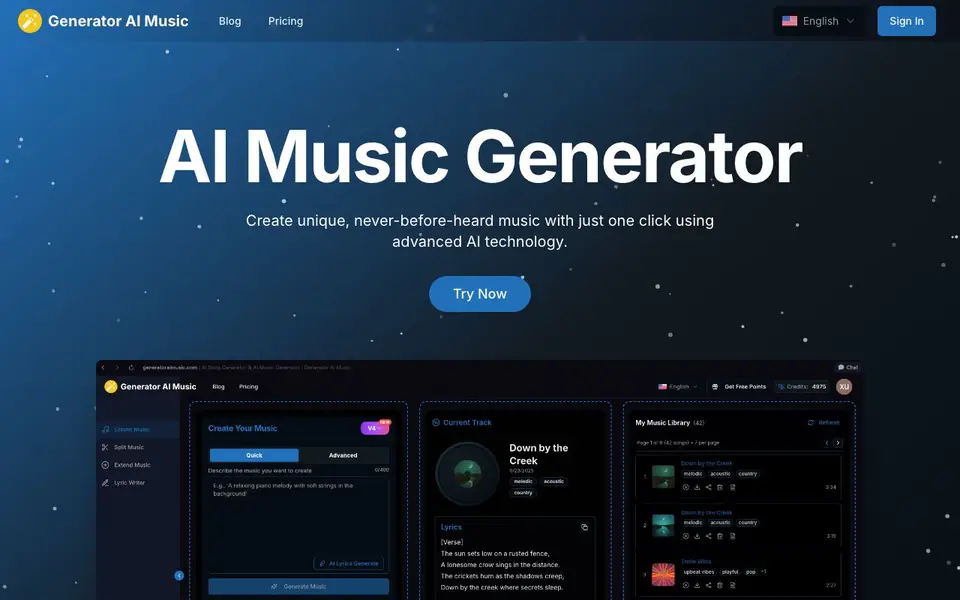
What is Generator AI Music?
Generator AI Music is a web-based tool that creates original music from your text or lyrics. You can also strip vocals from existing songs, separate tracks into individual stems, and remix tracks by changing tempo or style. It is aimed at creators who need quick, custom music without a studio.
To make a track, you choose Simple Mode for fast generation or Custom Mode for more control. In Custom Mode you describe the music, add lyrics, pick a style, and set a title. Then you click generate and wait a few minutes for your custom track to be created.
The tool suits social media creators, podcasters, and musicians. Social media users can get background music for videos or vlogs. Podcasters can make jingles and intros. Musicians can generate melodies and chord progressions. The site mentions features like music editing and cloning as coming in August, so those are not available yet.
Generator AI Music features
- Text to Music: Enter any text, pick a style, and get a full musical piece.
- Lyrics to Music: Turn your own lyrics into a complete song with matching vocals.
- Vocal Remover: Strip vocals from songs to create instrumentals or isolate vocals.
- Split Music: Separate songs into individual tracks for vocals, drums, bass, and more.
- Remix Music: Create new versions of songs by changing tempo, style, or adding effects.
What you can do with Generator AI Music
- Generate background music for YouTube videos or vlogs.
- Create custom jingles and intros for your podcast.
- Turn your written lyrics into a full song with vocals.
- Remove vocals from a track to make a karaoke version.
How to get started with Generator AI Music
- Choose Simple Mode for quick generation or Custom Mode for detailed settings.
- Describe your desired music or input custom lyrics, style preferences, and title.
- Click generate and wait a few minutes for your custom track.
Tips for better results with Generator AI Music
- Use Custom Mode instead of Simple Mode when you need specific lyrics, style, or tempo, since it gives you direct control over the final track.
- Describe your desired music in detail, including mood, instruments, and tempo, to help Generator AI Music produce a track that matches your vision.
- For karaoke or remixes, run the Vocal Remover first to get a clean instrumental, then apply Remix Music to adjust tempo or style.
- Before generating a full track, test Generator AI Music with short text prompts to see how it interprets styles, then refine your description for better results.
Generator AI Music pricing
Generator AI Music is a paid product. Check generatoraimusic.com for current plans and whether a demo or trial is offered.
What to check before you rely on Generator AI Music
- Check the pricing page to confirm the paid plan cost and what features are included, since the website does not list specific prices.
- Verify whether the free version has limits on track length or number of generations, as the site mentions free use but does not state limits.
- Review the privacy policy to see how your uploaded songs and lyrics are handled, because the website does not detail data usage or storage.
Who Generator AI Music is for
Generator AI Music suits social media creators, podcasters, musicians and content creators. If that is not you, the AI music generators below may fit better.
Similar tools compared with Generator AI Music
| Tool | What it is | Pricing |
|---|---|---|
| Generator AI Music | AI music generator with vocal and stem tools | Paid |
| AIVA | AI music generation assistant | Freemium |
| Soundraw | AI music generator for royalty-free beats | Freemium |
| Suno | AI music and song generator | Freemium |
| ElevenLabs | AI voice generator and voice agents platform | Freemium |
Generator AI Music FAQ
What can Generator AI Music do?
It creates original music from text or lyrics, removes vocals from songs, splits tracks into stems, and remixes existing songs by changing tempo or style. It also generates melodies based on your specifications.
Is there a free plan?
The website shows only paid plans starting at $14 per month for Basic. There is no mention of a free plan or free credits, so you likely need to subscribe to use the tool.
Who is Generator AI Music for?
It is designed for social media creators who need music for videos, podcasters who want custom jingles and intros, and musicians who want to generate melodies and chord progressions. The plans mention content creators and enterprises.
What file formats can I download?
All paid plans include MP3 downloads. The Basic plan also includes WAV and MIDI downloads, and higher plans include those as well. The site does not specify formats for the top Pro plan beyond unlimited credits.
Does Generator AI Music work on mobile devices or only on desktop?
Generator AI Music is a web-based tool, so you can access it from any device with a browser, including smartphones and tablets. The website does not mention dedicated mobile apps. For the best experience, use a modern browser on a device with a stable internet connection.
Can I export my Generator AI Music tracks to other software like DAWs or video editors?
Generator AI Music lets you download your generated tracks, but the website does not specify which file formats are available for export. To see the exact formats, check the download options after generating a track or contact support through the site.
Does Generator AI Music require an account to use the tool?
The website does not explicitly state whether an account is required to use Generator AI Music. You may need to sign in to save or manage your projects. For confirmation, try using the tool directly or check the sign-in page for details.


