

What is Endel?
Endel creates personalized soundscapes designed to support focus, relaxation, and sleep. Its patented technology generates audio that adapts in real-time based on inputs like time of day, weather, heart rate, and location. The company says neuroscience research shows consistent use improves focus and lowers stress.
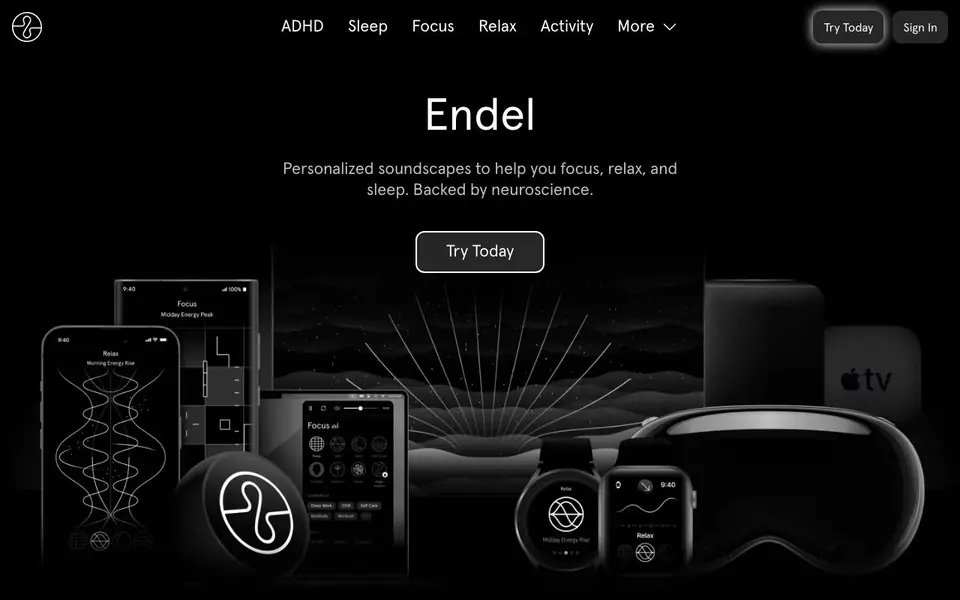
You start by choosing a mode—Focus, Relax, Sleep, or Activity—and Endel generates a soundscape that reacts to your current state. On mobile, you can use Autoplay to let the app pick the right sound for you automatically. On Apple Watch, it uses biometric data like heart rate for deeper personalization. You can also access Endel on Amazon Alexa, Apple TV, Fire TV, desktop, or your web browser.
Endel suits people who need help concentrating, winding down, or sleeping, including those with ADHD. The app has over 4 million downloads and won Apple Watch App of the Year in 2020. The website mentions collaborations with artists like James Blake, but notes streaming versions may not be personalized or adaptive.
Endel features
- Real-time adaptation: Soundscapes change based on time, weather, heart rate, and location.
- Autoplay mode: Automatically selects the best soundscape for your current state with one press.
- Apple Watch support: Uses heart rate and light sensors for personalized audio on your wrist.
- Alexa integration: Start soundscapes by voice on Echo devices, Fire TV, and more.
- Desktop and web apps: Access soundscapes from your browser or a distraction-free Mac app.
What you can do with Endel
- Boost productivity during deep work sessions with Focus soundscapes.
- Calm your mind before bed using Sleep mode with gentle sounds.
- Stay present during workouts with Activity soundscapes.
- Create a screen-free sleep routine with Alexa smart speakers.
How to get started with Endel
- Go to Endel's website and click Try Today to start.
- Choose a mode like Focus, Relax, or Sleep.
- Press play and let the soundscape adapt to your environment in real-time.
Tips for better results with Endel
- Pick a specific mode like Focus or Sleep before starting, and let Endel run for at least 10 minutes to hear how the soundscape adapts to your environment and time of day.
- Use Endel on Apple Watch with heart rate data for the most personalized audio, especially during workouts or stressful moments, since it adjusts to your biometric state in real time.
- Try Endel's Autoplay feature on mobile when you're unsure which mode fits your current mood, and let the app decide based on your daily rhythm and location.
- For a screen-free bedtime routine, say "Alexa, start Sleep with Endel" on an Echo device, and pair it with a timer to avoid listening all night and draining battery.
Endel pricing
Endel’s homepage does not list prices. Check endel.io for current plans.
What to check before you rely on Endel
- Check whether Endel requires a paid subscription for full features, since the website does not list pricing or a free tier limit.
- Verify that your device platform is supported—Endel lists iOS, Android, Apple Watch, Alexa, Fire TV, desktop, and web, but not all features work on every platform.
- Confirm that the soundscape you rely on is the adaptive version, because the website notes streaming collaborations may not be personalized or real-time.
Who Endel is for
Endel suits professionals, students, people with ADHD and sleep seekers. If that is not you, the AI music generators below may fit better.
Similar tools compared with Endel
| Tool | What it is | Pricing |
|---|---|---|
| Endel | Personalized adaptive soundscape generator | See website |
| AIVA | AI music generation assistant | Freemium |
| Soundraw | AI music generator for royalty-free beats | Freemium |
| Suno | AI music and song generator | Freemium |
| ElevenLabs | AI voice generator and voice agents platform | Freemium |
Endel FAQ
What does Endel do?
Endel generates personalized soundscapes that adapt in real-time to help you focus, relax, or sleep. It reacts to inputs like time of day, weather, heart rate, and location, and is backed by neuroscience research.
Is Endel free to use?
The website does not state pricing details. You can try it by clicking Try Today, but you'll need to check the app or site for current plan options and costs.
Who is Endel for?
Endel is for anyone who wants to improve focus, reduce stress, or sleep better. It's also mentioned as helpful for people with ADHD, and works across mobile, watch, smart speakers, TV, and desktop.
What devices does Endel work on?
Endel works on iOS and Android phones, Apple Watch, Amazon Alexa devices, Apple TV, Fire TV, Mac, and your web browser. It also offers albums on streaming platforms, though those may not be adaptive.
Can Endel export or connect to other apps or services?
The Endel website mentions integrations with Amazon Alexa and Apple Watch, but it does not list any direct exports or connections to other apps like Spotify, Apple Music, or fitness trackers. For the most current integration options, check the Endel app's settings or the official website.
Does Endel require an account to use?
The Endel website does not explicitly state whether an account is required. However, to access the app and its features, you likely need to sign up. For specific account requirements, check the Endel app's sign-up process or the website's FAQ section.
How does Endel handle my personal data, like heart rate or location?
Endel uses inputs like time, weather, heart rate, and location to personalize soundscapes, especially on Apple Watch. The website does not detail its data privacy practices. For information on data handling, review Endel's privacy policy, which should be linked in the app or on the website.


