

What is AIMusixer?
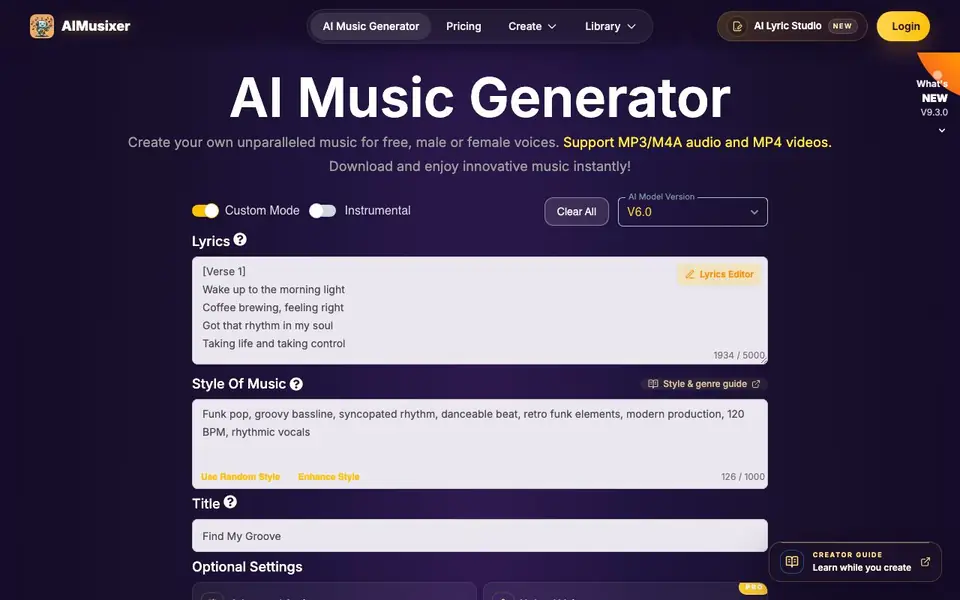
AIMusixer is an AI music generator that creates songs from your text descriptions. You can pick a vocal gender, adjust the style influence, and set a weirdness level to shape the output. It supports MP3, M4A, and MP4 downloads, so you can save your tracks in the format you need.
To start, you enter lyrics or let the tool generate them, choose a music style, and hit generate. You can also upload your own MP3 or M4A tracks up to 50 MB to add vocals, create instrumental versions, or make AI song covers. A Smart Refine feature lets you describe changes in natural language, and you can select specific sections of a song to rework.
The tool is free to try, with paid plans that give you credits for advanced features like Max mode for enhanced consistency. It's designed for anyone from casual singers to serious creators, and you can manage your creations in a library with progress tracking.
AIMusixer features
- Text-to-music generation: Create complete songs from your text prompts with vocals and instrumentals.
- Song uploads: Add your own MP3 or M4A tracks up to 50 MB to rework them with AI.
- Add vocals: Enter lyrics for a song section and generate a sung version while keeping your original.
- AI song covers: Restyle a finished vocal track in a different genre while preserving the melody.
- Smart Refine: Describe changes to lyrics, genre, or instruments in natural language to create new versions.
What you can do with AIMusixer
- Generate original songs from text prompts for personal enjoyment.
- Add AI vocals to your own instrumental tracks with custom lyrics.
- Create instrumental versions of existing songs for remixes or practice.
- Make AI song covers to explore different styles of your favorite tracks.
How to get started with AIMusixer
- Go to aimusixer.me and click Create to open the music generator.
- Enter your lyrics or use the Lyrics Editor, then pick a style and vocal gender.
- Hit Generate and download your song as MP3, M4A, or MP4.
Tips for better results with AIMusixer
- Start with a clear text prompt that describes the genre, mood, and instruments you want, then adjust the style influence and weirdness sliders to fine-tune the output.
- Use AIMusixer's Smart Refine feature to describe specific changes to lyrics, genre, or instruments in natural language, and select only the song sections you want reworked.
- Upload your own MP3 or M4A tracks up to 50 MB to add vocals or create instrumental versions, but ensure you own the rights or have permission before uploading.
- Experiment with the vocal gender and style influence controls on AIMusixer to match the voice and production style you need, and generate multiple versions to compare results.
AIMusixer pricing
AIMusixer has a free way to start, with paid plans for heavier use. Check aimusixer.me for current limits and prices.
What to check before you rely on AIMusixer
- Check the free plan's credit limits and whether advanced features like Max mode require a paid plan, as the website does not list specific free usage amounts.
- Verify that your uploaded audio files are under 50 MB and in MP3 or M4A format, since larger or other file types are not supported.
- Confirm that you have rights or permission for any uploaded tracks, as AIMusixer reviews uploads for copyright and does not state how long the review takes.
Who AIMusixer is for
AIMusixer suits music enthusiasts, content creators, songwriters and hobby musicians. If that is not you, the AI music generators below may fit better.
Similar tools compared with AIMusixer
| Tool | What it is | Pricing |
|---|---|---|
| AIMusixer | AI music generator from text | Freemium |
| AIVA | AI music generation assistant | Freemium |
| Soundraw | AI music generator for royalty-free beats | Freemium |
| Suno | AI music and song generator | Freemium |
| ElevenLabs | AI voice generator and voice agents platform | Freemium |
AIMusixer FAQ
Is AIMusixer free to use?
Yes, you can try the AI music generator for free on the website. Paid plans are available that give you credits for advanced features like Max mode and song uploads.
What audio formats can I download?
You can download your generated music as MP3 or M4A audio files, and MP4 videos. This lets you save your songs in the format that works best for your needs.
Can I upload my own music?
Yes, you can upload MP3 or M4A files up to 50 MB from your My Music Collection. You must own the rights or have permission, and uploads go through a copyright review.
What is Max mode?
Max mode is a paid feature that uses more computing resources to improve consistency in melody, style, vocals, and arrangement. It's off by default and adds 1 credit per generation.
Does AIMusixer have a mobile app or work on tablets?
AIMusixer is a web-based tool, so you can access it from any device with a browser, including phones and tablets. The website mentions it is easier to use on mobile devices, but there is no dedicated app mentioned. Check the site for any app download links.
What does the free plan of AIMusixer include exactly?
AIMusixer is free to try, and you can generate songs and download them in MP3, M4A, or MP4 formats without paying. Paid plans give you credits for advanced features like Max mode and for uploading your own tracks. The website does not specify a limit on free generations, so check your account for details.
Can I use AIMusixer for commercial projects like selling my music?
AIMusixer is designed for casual singers and serious creators, but the website does not explicitly state whether you can use generated music for commercial purposes. For clarity on usage rights, review the terms of service or contact the support team directly.


