

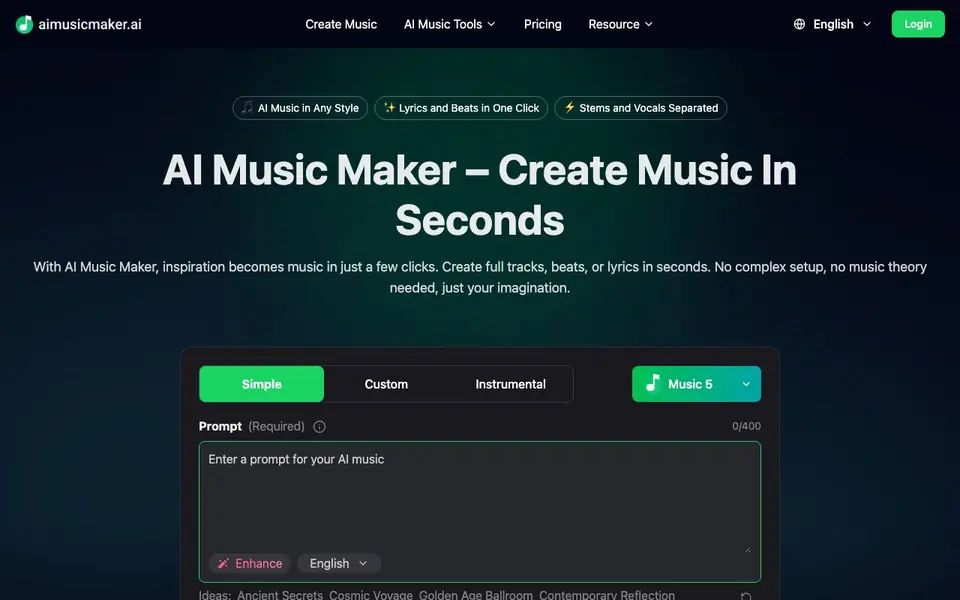
What is aimusicmaker?
AI Music Maker is an online tool that turns your words into music. You type a prompt describing the style, mood, or idea, and the AI generates a complete track. It can produce songs with vocals, instrumentals, or just lyrics, depending on what you need. The tool is designed for anyone, even if you have no music theory or production experience.
To start, you enter a prompt or upload a short vocal line. You can then pick the length, key, and tempo. Next, you choose a genre, instruments, and mood. You can also add extra tools like an AI Lyrics Generator, AI Music Extender, or Vocal Remover. After you generate, you preview the track and refine it if needed. Then you download it in MP3, WAV, or multi-track stems.
The tool suits content creators, artists, and hobbyists who want music for videos, podcasts, celebrations, or personal projects. It also offers vocal and instrumental separation, so you can extract vocals for remixes or create karaoke versions. The website shows example tracks with play counts and ratings, but it does not state pricing details or a free plan.
aimusicmaker features
- Instant song creation: Generate full tracks in seconds from a text prompt without complex setup.
- Lyrics and beats in one click: Create both lyrics and instrumental beats together in a single action.
- Stem and vocal separation: Split vocals and instruments for remixes, covers, or karaoke versions.
- Style customization: Choose genre, instruments, mood, length, key, and tempo to shape your track.
- High-quality downloads: Save your music in MP3, WAV, or multi-track stems, ready for publishing.
What you can do with aimusicmaker
- Create background music for YouTube videos or podcasts.
- Generate a personalized song for a birthday or celebration.
- Extract vocals from a track to make a karaoke version.
- Produce an instrumental beat for a rap or spoken-word project.
How to get started with aimusicmaker
- Type a prompt describing your musical idea or upload a short vocal line.
- Choose the length, key, tempo, genre, instruments, and mood.
- Generate your track, preview it, refine if needed, and download in MP3, WAV, or stems.
Tips for better results with aimusicmaker
- Describe the mood, genre, and instruments in your prompt for aimusicmaker, and specify length, key, and tempo before generating to get a track that matches your vision.
- Use aimusicmaker's AI Lyrics Generator and Vocal Remover together to create a full song with vocals, then extract the vocal stem for remixing or karaoke versions.
- Preview your generated track and refine it by adjusting the prompt or customization options, since small changes in genre or mood can significantly alter the output.
- Upload a short vocal line instead of typing a prompt when you have a specific melody in mind, and let aimusicmaker build the arrangement around it.
aimusicmaker pricing
aimusicmaker’s homepage does not list prices. Check aimusicmaker.ai for current plans.
What to check before you rely on aimusicmaker
- Check whether aimusicmaker offers a free tier or trial before committing, since the website does not state any pricing or plan details.
- Verify what ownership or usage rights you get for generated tracks, especially if you plan to publish them commercially, as this is not mentioned on the site.
- Confirm the maximum track length and stem export formats beyond MP3, WAV, and multi-track stems, because the website does not list any limits or additional options.
Who aimusicmaker is for
aimusicmaker suits content creators, musicians, beginners and hobbyists. If that is not you, the AI music generators below may fit better.
Similar tools compared with aimusicmaker
| Tool | What it is | Pricing |
|---|---|---|
| aimusicmaker | AI music and song generator | See website |
| AIVA | AI music generation assistant | Freemium |
| Soundraw | AI music generator for royalty-free beats | Freemium |
| Suno | AI music and song generator | Freemium |
| ElevenLabs | AI voice generator and voice agents platform | Freemium |
aimusicmaker FAQ
What can I create with AI Music Maker?
You can create full songs, beats, or lyrics from a text prompt. You can also generate instrumentals or separate vocals and instruments from existing tracks.
Do I need music theory or production experience?
No. The tool is designed for beginners and creators without music theory knowledge. You just describe your idea and the AI handles the rest.
What file formats can I download?
You can download your music in MP3, WAV, or multi-track stems. This gives you flexibility for publishing or further editing.
Is there a free plan or pricing information?
The website does not state pricing or a free plan. You can check the Pricing page on the site for current details.
Can I use AI Music Maker on my phone or tablet?
AI Music Maker is an online tool, so you can access it through a web browser on any device with an internet connection, including phones and tablets. The website does not mention dedicated mobile apps, so check the site for the latest access options.
Does AI Music Maker require me to create an account to use it?
The website does not state whether an account is required to use AI Music Maker. You can start by typing a prompt and generating a track directly on the page. For details on account requirements, check the login or sign-up section on the site.
What can I do with the music I create in AI Music Maker?
You can download your tracks from AI Music Maker in MP3, WAV, or multi-track stems, which are ready for publishing. The tool is suited for videos, podcasts, celebrations, or personal projects. The website does not mention specific licensing terms, so review its terms for commercial use.


