

What is AI Music Maker?
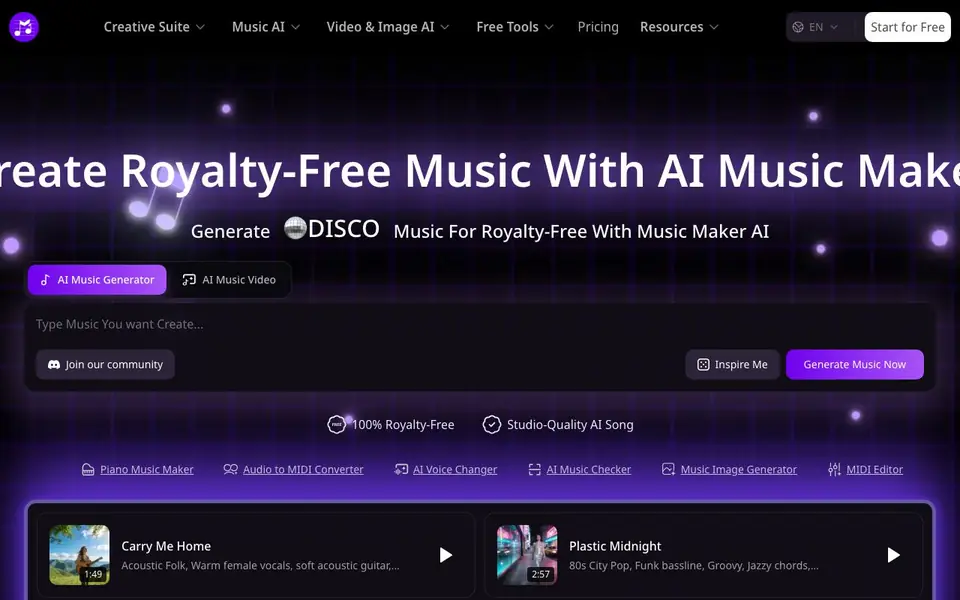
AI Music Maker is an online tool that creates original, royalty-free music using advanced text-to-music models. You can generate studio-quality songs in seconds, with no watermark. It supports multiple creative features beyond simple generation, making it a versatile suite for music projects.
To start, you enter a brief text prompt or custom lyrics, and the AI produces a complete track. You can also upload an image to transform visuals into melodies. Additional tools include a lyrics generator for inspiration and vocal separation to isolate vocals from existing songs. The interface is straightforward, designed for quick creation.
This tool suits independent filmmakers, YouTubers, game developers, and music teachers who need affordable, personalized soundtracks. It helps lower production costs and speeds up creative workflows. The website highlights its use across film scoring, game soundtracks, content creation, education, advertising, and podcast production.
AI Music Maker features
- Text-to-Music Generation: Input text prompts or custom lyrics to generate high-quality, royalty-free original music in seconds.
- AI Image-to-Music Generation: Upload images for free and transform visuals into unique melodies and songs.
- AI Lyrics Generator: Get instant lyrical inspiration, creative frameworks, and intelligent suggestions for effortless songwriting.
- AI Vocal Separation: Isolate vocals from songs using AI technology to get high-quality independent tracks.
- Watermark-Free Output: Generate music without watermarks, ensuring clean, professional results for your projects.
What you can do with AI Music Maker
- Create original soundtracks for independent films to enhance emotional impact.
- Generate unique background music for YouTube videos to boost engagement.
- Produce atmospheric game soundtracks for indie game development projects.
- Develop diverse teaching resources for music education classrooms.
How to get started with AI Music Maker
- Visit the AI Music Maker website and click 'Start for Free' or 'Generate Music Now'.
- Enter a text prompt or custom lyrics, or upload an image to generate music.
- Listen to the generated track and download it for your project, royalty-free.
Tips for better results with AI Music Maker
- Describe the mood, instruments, tempo, and genre in your text prompt to get a track that matches your project's tone more closely.
- Use AI Music Maker's lyrics generator first to craft custom lyrics, then paste them into the text-to-music feature for a more personalized song.
- Upload a clear, high-contrast image to the image-to-music tool, as AI Music Maker translates visual elements into melodies more accurately from detailed visuals.
- Experiment with different prompt lengths and styles in AI Music Maker, then compare the outputs to find the best fit for your video or film scene.
AI Music Maker pricing
AI Music Maker has a free way to start, with paid plans for heavier use. Check musicmaker.im for current limits and prices.
What to check before you rely on AI Music Maker
- Check the freemium plan limits, as the website does not state how many generations or downloads you get for free before paying.
- Verify the export formats and audio quality available, since the site does not list whether you can download MP3, WAV, or other files.
- Review the privacy policy for how your uploaded images and lyrics are handled, as the website does not mention data retention or usage rights.
Who AI Music Maker is for
AI Music Maker suits independent filmmakers, YouTubers, indie game developers and music teachers. If that is not you, the AI music generators below may fit better.
Similar tools compared with AI Music Maker
| Tool | What it is | Pricing |
|---|---|---|
| AI Music Maker | AI music generator for royalty-free songs | Freemium |
| AIVA | AI music generation assistant | Freemium |
| Soundraw | AI music generator for royalty-free beats | Freemium |
| Suno | AI music and song generator | Freemium |
| ElevenLabs | AI voice generator and voice agents platform | Freemium |
AI Music Maker FAQ
Is AI Music Maker free to use?
The website says you can start for free and generate unlimited royalty-free music. It also mentions free tools and a pricing page, suggesting a freemium model with paid plans for advanced features.
What can I create with AI Music Maker?
You can generate original songs from text prompts, lyrics, or images. It also offers a lyrics generator, vocal separation, and tools for album covers, music logos, and music videos, covering various parts of a music project.
Who is AI Music Maker for?
It is designed for creators like independent filmmakers, YouTubers, indie game developers, and music teachers. The website highlights use cases in film scoring, content creation, game soundtracks, education, advertising, and podcast production.
Does AI Music Maker produce royalty-free music?
Yes, the website states that generated music is 100% royalty-free. This means you can use the tracks in your projects without worrying about copyright fees, which is a key feature for content creators.
Can AI Music Maker export my generated tracks as MP3 or WAV files?
The AI Music Maker website does not specify the exact export formats for generated tracks. To find out which file types are available for download, check the tool's interface after generating a song or visit the pricing page for details on download options.
Does AI Music Maker work on mobile devices like a phone or tablet?
AI Music Maker is an online tool, so you can access it through a web browser on most devices, including phones and tablets. The website does not mention a dedicated mobile app, but the browser-based version should work on mobile as long as you have an internet connection.
What does the free plan of AI Music Maker include?
The AI Music Maker website labels the tool as freemium, but it does not list the specific limits of the free plan, such as the number of generations or downloads. To see what you get for free, sign up or check the pricing page for a comparison of free versus paid features.


