

What is AdScriptly?
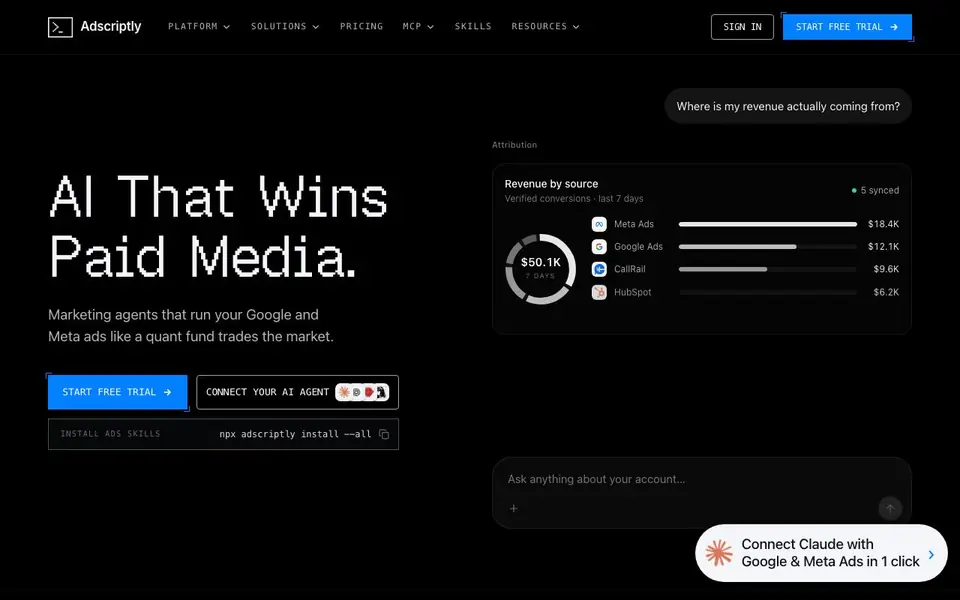
Adscriptly is an AI advertising platform that manages Google and Meta ads using real revenue data. Its marketing agents work like a quant fund trading the market, constantly adjusting budgets, keywords, and creative based on actual performance. You stay in control because every change requires your approval.
Getting started is straightforward. You connect your ad accounts, CRM, calls, and forms. Adscriptly then syncs conversion data and builds a full-funnel knowledge graph. You can ask questions about your account in plain language, automate tasks, or let scheduled agents run playbooks like a Monday negatives sweep or daily pacing check.
The platform works wherever you do. It integrates with Slack, Claude, ChatGPT, Cursor, and Microsoft Teams through an MCP connector. Server-side tracking catches visitors that ad blockers and browser limits miss, including iOS and cookie-rejected users. It also resolves cross-device journeys and offline conversions into bidding signals.
AdScriptly features
- AI agents: Agents harvest converting search terms, catch CPA drift, and flag fatigued creative across Google and Meta.
- Scheduled playbooks: Pick a cadence like daily pacing or Friday recap, and it runs automatically in your timezone.
- Server-side tracking: First-party fingerprinting catches iOS, ad-blocked, and cookie-rejected visitors.
- Full-funnel knowledge graph: Cross-device journeys and offline conversions get mapped into bidding signals.
- Slack reports: Each run posts findings and changes to your team's channel and answers follow-ups in the thread.
What you can do with AdScriptly
- Ask your ad account questions in plain language and get actionable answers.
- Automate negative keyword sweeps to stop wasted spend on irrelevant searches.
- Reallocate budget from broad to brand campaigns based on projected conversion value.
- Sync scored calls and CRM stages back to Google and Meta for smarter bidding.
How to get started with AdScriptly
- Start a free trial and create your Adscriptly account.
- Connect your Google and Meta ads, plus your CRM, calls, and forms.
- Install the MCP connector or schedule your first agent playbook.
Tips for better results with AdScriptly
- Connect your ad accounts, CRM, calls, and forms first so Adscriptly can build a full-funnel knowledge graph from real revenue data before you ask it anything.
- Start with a scheduled playbook like a Monday negatives sweep or daily pacing check, and review the queued changes before approving them to keep control.
- Use Adscriptly's plain-language questions to find wasted spend, such as campaigns with no booked calls, then queue negatives or budget shifts from the answers.
- Install the Adscriptly MCP connector in Slack or ChatGPT so you can run analysis and approve optimizations from the chat tools your team already uses.
AdScriptly pricing
AdScriptly offers a free trial before you pay. Check adscriptly.com for current plans.
What to check before you rely on AdScriptly
- Check whether the free trial includes all features or limits agent runs, scheduled playbooks, or Slack reports, since the website does not state trial limits.
- Verify if your ad accounts and CRM platforms are supported for sync, as the website lists examples but not a full compatibility list.
- Confirm what data Adscriptly stores from your ad accounts and CRM, since the website does not detail data retention or privacy policies.
Who AdScriptly is for
AdScriptly suits paid media managers, marketing teams, B2B SaaS companies and growth marketers. If that is not you, the AI marketing tools below may fit better.
Similar tools compared with AdScriptly
| Tool | What it is | Pricing |
|---|---|---|
| AdScriptly | AI advertising platform for Google and Meta ads | Free trial |
| Copy.ai | AI-native go-to-market platform | See website |
| Jasper | AI agent workspace for marketing teams | Free trial |
| Writesonic | AI search growth and visibility platform | See website |
| Predis.ai | AI ad generator for video, UGC, and images | Freemium |
AdScriptly FAQ
What does Adscriptly do exactly?
It runs Google and Meta ads using AI agents that optimize budgets, keywords, and creative. The agents use real revenue data from your CRM, calls, and forms to make decisions, and you approve changes before they go live.
Is there a free plan?
The website offers a free trial, but it does not state whether a free plan exists after the trial. Check the pricing page on Adscriptly's website for current plan details.
Who is Adscriptly for?
It suits marketing teams and paid media managers who run Google and Meta ads and want automation. The site highlights B2B SaaS companies as a use case, but it works for any advertiser with revenue data to sync.
Can I use Adscriptly with Slack or ChatGPT?
Yes. Adscriptly connects to Slack, Claude, ChatGPT, Cursor, Microsoft Teams, and iMessage through an MCP connector. You paste a server URL, sign in, and ask questions or run tasks right in your chat tool.
Can Adscriptly export my ad data or connect to other tools beyond Slack and ChatGPT?
Adscriptly integrates with Slack, Claude, ChatGPT, Cursor, and Microsoft Teams through an MCP connector. The website does not mention exporting data to other platforms. For specific export options, check the platform's documentation or contact support.
Does Adscriptly run on mobile devices or only on desktop?
The Adscriptly website does not specify device support. It is a web-based platform, so it likely works on any device with a browser, but for confirmation, check the platform's documentation or contact support.
What does the Adscriptly free trial include and do I need a credit card to start?
Adscriptly offers a free trial, but the website does not detail what it includes or whether a credit card is required. To find out, visit the pricing page or start the trial to see the sign-up requirements.


