

What is Komo AI?
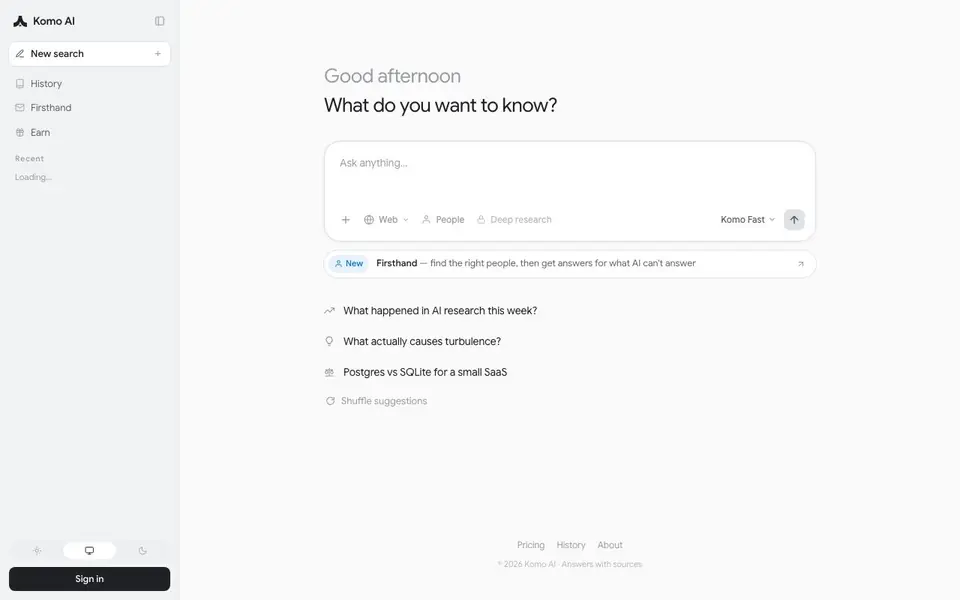
Komo is an AI-powered search engine that answers your questions by pulling from the web and showing you the sources behind each answer. You can ask natural-language questions and get concise, cited responses instead of a list of links. It also offers specialized modes like People search and Deep research for deeper investigation.
To use it, you simply type a question on the homepage, choose a mode (Web, People, or Deep research), and Komo returns an answer with sources you can check. The Fast mode gives quicker responses, while Deep research is for more thorough inquiries but requires a paid plan. You can save searches, view history, and sign in to track your activity.
Komo suits anyone who wants faster, more reliable answers than a traditional search engine, especially researchers, students, and professionals. The site mentions that Deep research is paid, but the basic search appears free. It also has a Firsthand feature to help you find the right people for questions AI can't answer, plus an earn program.
Komo AI features
- Cited answers: Every response includes sources so you can verify the information yourself.
- Deep research: Paid mode for thorough, in-depth answers on complex topics.
- People search: Find the right people to ask when AI can't answer your question.
- Fast mode: Get quicker responses for simple or urgent queries.
- Search history: Access your past searches and pick up where you left off.
What you can do with Komo AI
- Ask about recent AI research developments and get summarized, sourced answers.
- Check what causes turbulence with a clear explanation and references.
- Compare Postgres and SQLite for a small SaaS project using cited data.
- Find experts on a topic through the Firsthand people search feature.
How to get started with Komo AI
- Go to Komo's homepage and type your question in the search box.
- Choose a mode like Web, People, or Deep research based on your need.
- Review the answer and click the sources to verify or explore further.
Tips for better results with Komo AI
- Start with Web mode for everyday questions to get cited answers quickly, then switch to Deep research only when you need a thorough investigation and have a paid plan.
- Use Komo AI's People search mode when your question involves expert opinions or experiences, since it connects you with real people instead of relying solely on AI-generated answers.
- Check the sources listed under each Komo AI response before trusting the information, especially for recent or technical topics where accuracy matters most.
- Save searches and review your history in Komo AI to track what you've already asked, which helps you refine follow-up questions and avoid repeating the same queries.
Komo AI pricing
Komo AI has a free way to start, with paid plans for heavier use. Check komo.ai for current limits and prices.
What to check before you rely on Komo AI
- Verify whether the free plan includes all modes you need, since Deep research requires a paid plan and the website does not list exact limits for free usage.
- Confirm what data Komo AI collects from your searches and history, as the website does not state its privacy policy or data retention practices clearly.
- Check if you can export or share your cited answers and saved searches, because the website does not mention any export formats or sharing options.
Who Komo AI is for
Komo AI suits researchers, students, professionals and curious learners. If that is not you, the AI search engines below may fit better.
Similar tools compared with Komo AI
| Tool | What it is | Pricing |
|---|---|---|
| Komo AI | AI web search with cited answers | Freemium |
| You.com | AI-ready web search and answer APIs | Freemium |
| Perplexity | AI answer engine with real-time search | Free |
| Felo | Multilingual AI search and creation platform | Freemium |
| Consensus | AI search engine for research papers | See website |
Komo AI FAQ
Is Komo AI free to use?
Basic search appears free, but Deep research requires a paid plan. The website doesn't list specific prices or a free tier limit, so check the Pricing page for details.
How does Komo answer questions?
It searches the web and generates answers with sources you can click to verify. You can choose different modes like Web for general queries or Deep research for more thorough responses.
What is the Firsthand feature?
Firsthand helps you find the right people to ask when AI can't answer a question. It's for getting human expertise on topics that need personal knowledge or experience.
Can I see my past searches?
Yes, Komo has a History feature that stores your past searches. You can also sign in to track your activity and access your search history across sessions.
Can Komo AI export or connect to other apps like Notion or Slack?
The Komo AI website does not mention any exports or integrations with apps like Notion or Slack. You can check the pricing or history pages for updates, but as of now, the site only shows search, history, and the Firsthand feature. For specific integration details, contact Komo AI directly.
Does Komo AI run on mobile devices or only on desktop browsers?
The Komo AI website does not specify whether it has a mobile app or works on tablets. You can access it through any web browser on your phone or computer, since it is a web-based search engine. For app availability, check the site's footer or app stores, but the website itself does not mention one.
What does the free plan of Komo AI include besides basic search?
The free plan of Komo AI includes basic web search with cited answers, Fast mode, People search, and search history. Deep research requires a paid plan, as stated on the homepage. The website does not list other free limits, so check the pricing page for full details on what is included.


