

What is Exa?
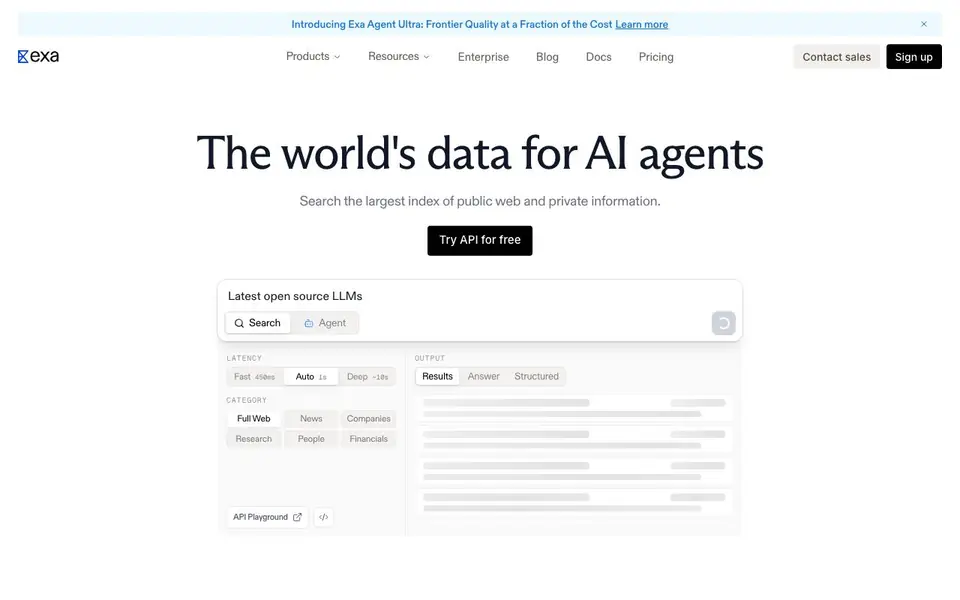
Exa is a search API built for AI agents and developers. It searches a large index of public web and private information, returning results, answers, or structured data. You choose the latency: fast results in under 180ms, auto mode around one second, or deep research taking about ten seconds.
You start by signing up and trying the API for free. Then you configure your search category—full web, news, companies, research, people, or financials. You can request plain results, a generated answer, or structured outputs like company names and CEOs. Exa also offers token-efficient highlights, which extract the most relevant excerpts to reduce tokens passed to models by up to 90%.
Exa suits developers building AI agents, coding assistants, or research tools. It claims best-in-class accuracy on benchmarks like FRAMES, Tip-of-Tongue, and Seal0. Enterprise features include SOC 2 Type II, GDPR, CCPA, HIPAA, zero data retention, and custom agreements. The site notes 500,000 developers use it and mentions customers like Cognition and HubSpot.
Exa features
- Multiple latency modes: Choose fast, auto, or deep search depending on your need for speed or thoroughness.
- Structured outputs: Get enrichments like company names, CEOs, and founding years across 70M+ companies.
- Token-efficient highlights: Extracts concise, relevant excerpts to cut tokens passed to models by up to 90%.
- Search verticals: Search full web, news, companies, research, people, or financials from one endpoint.
- Enterprise security: SOC 2 Type II, GDPR, CCPA, HIPAA, and zero data retention options available.
What you can do with Exa
- Power your coding agent with token-efficient search across docs and repos.
- Build a lead generation engine that enriches company data automatically.
- Add deep research capabilities to your AI assistant with grounded citations.
- Search people and companies for sales or recruiting workflows.
How to get started with Exa
- Sign up on Exa's website and get API access for free.
- Choose your latency mode and search category in the API playground.
- Integrate the API into your agent and request results, answers, or structured data.
Tips for better results with Exa
- Start with the API playground to test fast, auto, and deep latency modes before coding, so you know which speed fits your use case.
- Use Exa's structured outputs for company data to get clean fields like CEO names and founding years, saving parsing effort.
- Enable token-efficient highlights when passing search results to a model, as Exa can cut tokens by up to 90%.
- Pick a search vertical like news or financials in Exa to narrow results, improving accuracy for domain-specific queries.
Exa pricing
Exa has a free way to start, with paid plans for heavier use. Check exa.ai for current limits and prices.
What to check before you rely on Exa
- Verify your plan's request limits and pricing details on the pricing page, as the site does not list specific free-tier quotas.
- Confirm data retention and privacy settings match your needs, since zero data retention is only mentioned as an enterprise option.
- Check whether Exa's API supports your target platforms and languages, as the site does not list explicit SDKs or integration guides.
Who Exa is for
Exa suits developers, AI agent builders, research tool makers and enterprise teams. If that is not you, the AI search engines below may fit better.
Similar tools compared with Exa
| Tool | What it is | Pricing |
|---|---|---|
| Exa | Web search API for AI agents | Freemium |
| You.com | AI-ready web search and answer APIs | Freemium |
| Perplexity | AI answer engine with real-time search | Free |
| Felo | Multilingual AI search and creation platform | Freemium |
| Consensus | AI search engine for research papers | See website |
Exa FAQ
What does Exa's search API do?
Exa provides a web search API for AI agents. It searches public web and private information, returning results, generated answers, or structured data. You can configure latency from fast to deep research.
Is Exa free to use?
Yes, Exa offers a free trial of the API. You can sign up and try it. For full details on limits and paid plans, check the pricing page on their website.
Who is Exa for?
Exa is for developers building AI agents, coding assistants, or research tools. It's also used by enterprise teams needing secure, scalable web data. The site mentions 500,000 developers and customers like Cognition and HubSpot.
What security and compliance does Exa offer?
Exa provides SOC 2 Type II, GDPR, CCPA, and HIPAA compliance. It also offers zero data retention, meaning your queries and results are never stored or trained on. Enterprise agreements are available.
What can Exa export or connect to?
Exa is an API, so you can connect it to your own applications, AI agents, or coding tools. The website does not list specific integrations like Slack or Zapier. You can use Exa's API to send search results, answers, or structured data to any system that can make HTTP requests. Check the docs for code examples.
Does Exa run on any specific devices or platforms?
Exa is a cloud-based API, so it runs on any platform that can make HTTP requests, such as servers, web apps, or local scripts. There is no mention of a mobile app or desktop client. You access Exa through its API and playground, so you need an internet connection and a way to call the API.
What does Exa's free plan include?
Exa's pricing is freemium, meaning you can start for free. The website says you can 'try the API for free' after signing up. It does not specify exact limits on requests or features for the free tier. For detailed limits, check the pricing page or contact sales.


